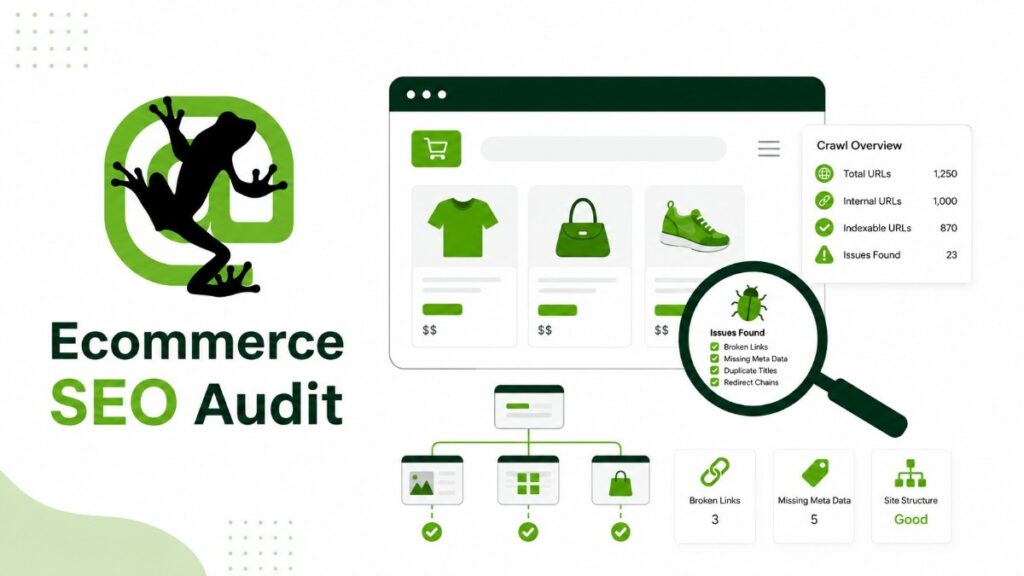




We use Screaming Frog SEO Spider as a way to see an ecommerce site the same way Google does. It lets us step inside the crawl process and understand what search engines actually encounter when they move through your store.
When we run a crawl, we’re not just collecting data. We’re mapping how your category pages, product pages, filters, pagination, images, canonicals, and redirects connect together. This is where hidden issues usually show up things that quietly affect rankings, indexing, and product visibility.
For smaller stores, the free version is often enough to get started. But once we work with larger ecommerce sites, we quickly hit scale limits. When a store has thousands of products, filter combinations, and parameter URLs, a paid version is usually needed to properly understand and audit everything at scale.
In this guide, we’ll walk through how we actually set up a crawl, what we focus on inside the reports, and how we turn raw Screaming Frog data into clear, practical SEO actions that improve how your store performs in search.
What Should a Screaming Frog Ecommerce Audit Check?
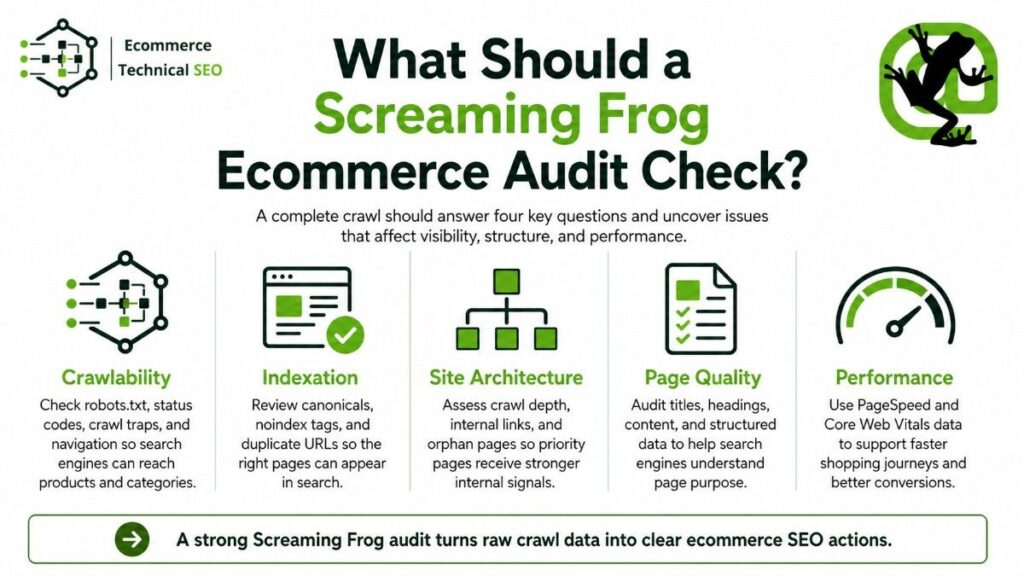
A complete crawl should answer four questions:
- Can search engines reach important pages?
- Are the correct URLs indexable?
- Can search engines understand each page?
- Does internal linking show which pages matter most?
These questions separate crawling problems from indexing, relevance, and site architecture problems.
| Audit area | What to check | Business impact |
| Crawlability | Robots.txt, status codes, crawl traps and navigation | Search engines can reach products and categories |
| Indexation | Canonicals, noindex tags and duplicate URLs | Correct pages can appear in search |
| Site architecture | Crawl depth, internal links and orphan pages | Priority pages receive stronger internal signals |
| Page quality | Titles, headings, content and structured data | Search engines understand page purpose |
| Performance | PageSpeed and Core Web Vitals data | Faster shopping journeys and better conversions |
Understanding the difference between crawling and indexing prevents a common audit mistake: assuming every crawled URL should appear in Google.
Step 1: Prepare Screaming Frog Before Crawling
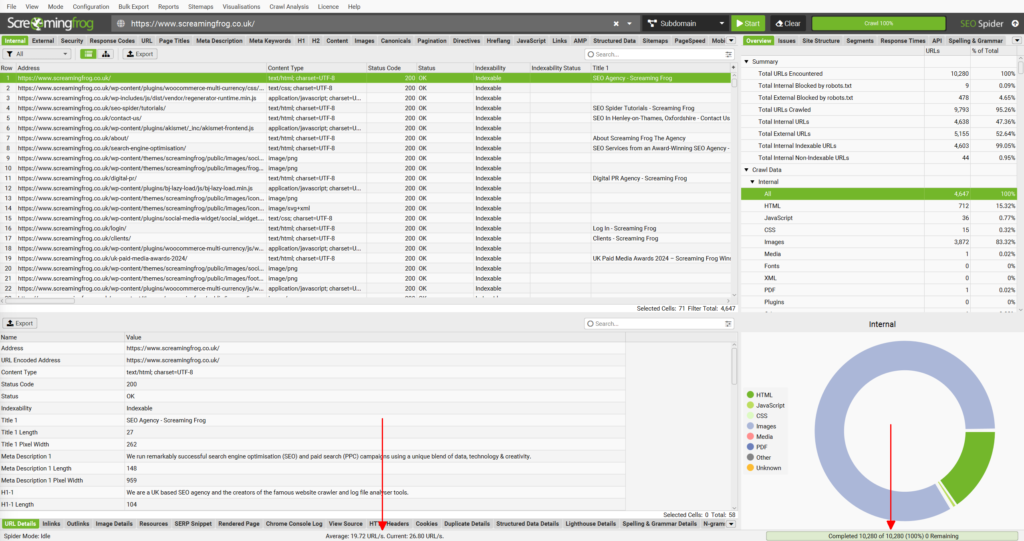
Do not enter the homepage and immediately start the crawl.
Ecommerce websites can generate large numbers of filter, sort, search, session, tracking, and pagination URLs. A poor configuration may waste time crawling duplicate URL combinations while missing important content.
Choose the Correct Storage Mode
For smaller websites, the default memory storage may be enough.
For a large store, use database storage:
Configuration > System > Storage Mode > Database Storage
Screaming Frog states that the crawler can process millions of URLs when the hardware, memory, storage, and configuration are suitable. Its large-site guidance recommends an SSD and at least 16 GB of RAM for crawls exceeding one million URLs.
Decide Between HTML and JavaScript Rendering
Start with an HTML crawl unless important links or content only appear after JavaScript runs.
Use JavaScript rendering when:
- Product links load through client-side scripts.
- Faceted navigation depends on JavaScript.
- Product descriptions are absent from raw HTML.
- Canonical tags change after rendering.
- A headless storefront builds pages in the browser.
Enable it under:
Configuration > Spider > Rendering > JavaScript
Screaming Frog officially recommends this configuration for crawling JavaScript websites.
JavaScript crawling uses more resources, so compare a sample of HTML and rendered pages before crawling the full store.
Control URL Parameters
Parameters can create thousands of crawlable URLs from a small product catalogue.
Common examples include:
- ?sort=price
- ?color=blue
- ?size=large
- ?page=2
- ?utm_source=email
- ?sessionid=123
Do not exclude every parameter automatically. Some filter combinations may target useful search demand, while others create duplicate or low-value pages.
Review how the store should manage URL parameters before creating exclusion rules.
| Parameter type | Typical SEO decision | Crawl treatment |
| Tracking parameters | Usually duplicate | Exclude or normalize |
| Sorting parameters | Usually duplicate | Exclude from focused crawls |
| Pagination | Often needed for discovery | Crawl and inspect |
| Faceted filters | Depends on search value | Segment by filter type |
| Internal search URLs | Usually low value | Check for links, then restrict |
| Product variants | Depends on page uniqueness | Audit canonicals and content |
Step 2: Run a Controlled Baseline Crawl
Enter the preferred homepage URL and begin the crawl.
For the first crawl, avoid aggressive exclusions unless the site is extremely large. The baseline crawl should reveal how the website behaves naturally.
Record:
- Total internal HTML URLs
- Crawl completion time
- Blocked URLs
- Parameter patterns
- Response code totals
- Indexable URL count
- Canonicalized URL count
- Average crawl depth
Save the crawl before changing the configuration. This gives you a reference point for later comparisons.
Compare the baseline crawl with Google Search Console’s Page Indexing and URL Inspection reports to identify URLs Google knows about but Screaming Frog did not discover through internal links.
You can also run separate crawls for product directories, category directories, or specific subdomains. Segmentation makes large datasets easier to review.
A wider technical SEO audit can combine crawl findings with Google Search Console, analytics, server logs, templates, and manual page testing.
Step 3: Review Status Codes and Broken Links
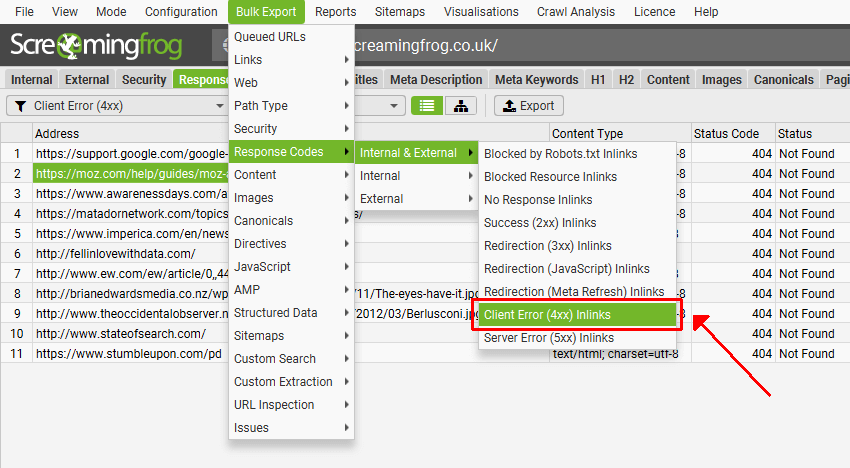
Open the Response Codes tab and filter by status.
Fix Internal 4xx Errors
Internal links pointing to 404 or 410 pages waste crawl activity and create poor shopping journeys.
For each broken URL, use the Inlinks tab to find the source pages linking to it.
Choose the correct action:
- Restore the page when it was removed accidentally.
- Redirect it when a close replacement exists.
- Update internal links to the final destination.
- Remove links when no useful replacement exists.
- Keep a genuine 404 when the content is permanently unavailable.
Avoid redirecting every discontinued product to the homepage. That creates a weak user experience and may produce soft-404 signals.
Find Redirect Chains and Loops
A redirect chain occurs when one URL redirects through multiple steps before reaching the final page.
For example:
Product A → Old Product B → Category C
Internal links should normally point directly to Category C.
Export redirect problems through:
Reports > Redirects > Redirect Chains
Prioritize chains found in navigation, category grids, XML sitemaps, product recommendations, or high-traffic pages.
| Status | Meaning | Recommended action |
| 200 | Successful response | Confirm that the content is correct |
| 301 | Permanent redirect | Update internal links to the final URL |
| 302/307 | Temporary redirect | Confirm whether temporary treatment is intended |
| 404 | Page not found | Restore, redirect, remove or retain intentionally |
| 5xx | Server failure | Escalate to hosting or development teams |
| Blocked | Crawl access restricted | Review robots.txt and other controls |
Step 4: Audit Robots.txt and Indexing Directives
Robots.txt controls crawling. It does not provide a reliable instruction to remove a URL from Google’s index.
Google Search Central confirms that noindex must be delivered through a meta tag or HTTP header because Google does not support noindex rules inside robots.txt.
Review the Indexability, Indexability Status, and Directives columns.
Look for valuable pages marked as:
- Blocked by robots.txt
- Noindex
- Canonicalized
- Noindex and blocked
- Non-indexable because of an error
- Indexable despite being low value
A product or category blocked in robots.txt may prevent search engines from crawling its content or seeing page-level directives.
An effective ecommerce robots.txt setup should reduce unnecessary crawling without blocking important products, categories, assets, or rendering resources.
Create an indexability matrix for major templates:
| Page type | Usually crawlable? | Usually indexable? |
| Main category | Yes | Yes |
| Active product | Yes | Yes |
| Valuable filter page | Yes | Sometimes |
| Sort URL | Limited | Usually no |
| Internal search result | Limited | Usually no |
| Cart and checkout | Sometimes | No |
| Customer account | Sometimes | No |
| Discontinued product | Depends | Depends on replacement strategy |
The correct rules depend on search demand, product availability, duplication, internal links, and business goals.
Step 5: Check Canonical Tags
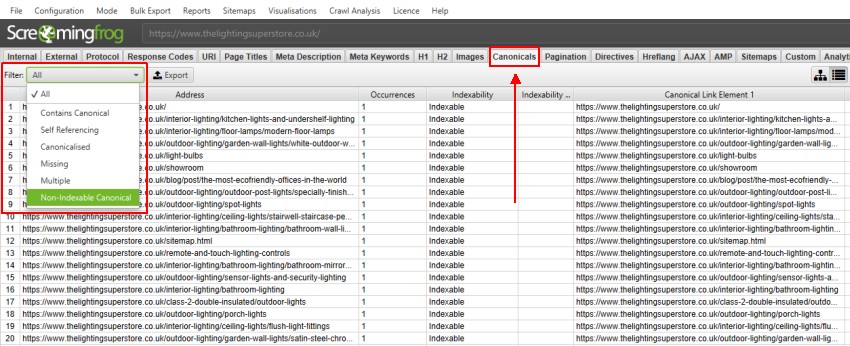
Open the Canonicals tab and review the filters.
Focus on:
- Missing canonicals
- Multiple canonicals
- Canonicals pointing to redirects
- Canonicals pointing to errors
- Non-indexable canonical targets
- Canonical loops
- Canonicals to unrelated pages
- Parameter pages with inconsistent targets
Screaming Frog can collect canonical elements from both HTML and HTTP headers and report common implementation errors.
Most indexable category and product pages should use a self-referencing canonical unless a deliberate consolidation strategy requires another target.
Validate these decisions against Google Search Central’s canonicalization guidance, which explains that redirects, canonicals, sitemap inclusion, internal links, and other signals can influence Google’s selected canonical.
Do not assume that adding a canonical solves every duplicate-content problem. Google treats canonical tags as signals, while internal links, sitemaps, redirects, page content, and URL consistency can support or conflict with that signal.
A structured ecommerce audit process should compare declared canonicals with the URLs Google actually selects.
Step 6: Find Crawl Traps in Faceted Navigation
Faceted navigation is one of the biggest technical risks on ecommerce websites.
Filters may generate near-unlimited combinations of brand, size, price, material, colour, rating, availability, and shipping options.
Warning signs include:
- Rapid URL growth during the crawl
- Repeated directory patterns
- Long parameter strings
- Empty filter pages
- Filters returning the same products
- Multiple parameter orders producing identical pages
- Calendar or price-range combinations
- Filter links available on every page
Use the URL tab, filters, and regular-expression searches to group parameter patterns.
Then compare each pattern against:
- Organic search demand
- Unique product selection
- Unique page content
- Internal linking
- Canonical treatment
- Index coverage
- Crawl frequency
This is a key “missing entity” in basic Screaming Frog guides: crawl-space management. The goal is not simply to reduce URL numbers. It is to help crawlers spend more time on pages that can rank and generate revenue.
For large stores, compare the crawl with server log analysis to confirm which parameter patterns Googlebot actually requests and whether important product or category pages receive regular crawler attention.
Step 7: Audit Internal Linking and Crawl Depth
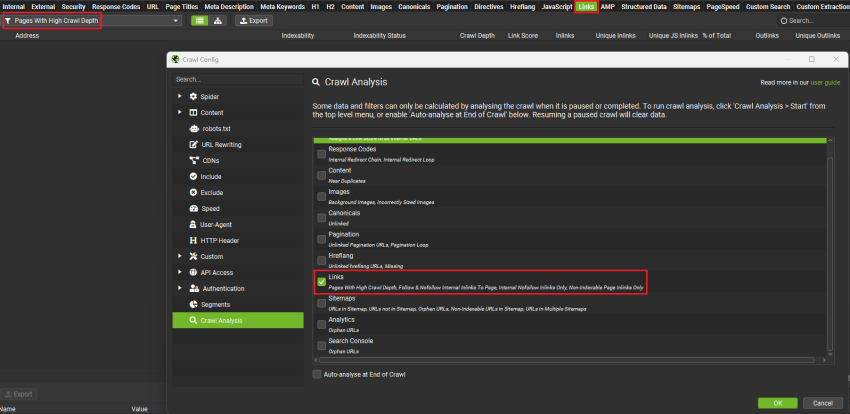
Screaming Frog records inlinks, outlinks, crawl depth, link position, and Link Score.
Use this data to identify:
- Important categories buried too deeply
- Products with few internal links
- Orphan or near-orphan pages
- Broken links in product grids
- Links pointing through redirects
- Categories receiving excessive sitewide links
- Important pages linked only from XML sitemaps
Priority category pages should normally be reachable through clear navigation paths.
Google’s ecommerce site-structure guidance also recommends connecting pages through crawlable navigation because Googlebot generally does not discover products by submitting searches into an internal search box.
Your category linking structure should connect parent categories, subcategories, products, buying guides, and related collections according to shopper needs.
Screaming Frog’s internal-linking reports can help locate weak pages and linking opportunities across a crawl.
Find True Orphan Pages
A standard crawl cannot discover a page that has no crawlable internal links.
Connect Google Search Console and analytics data, or upload XML sitemap URLs, to find pages known through other sources but absent from the crawl.
Check whether each orphan URL is:
- A valid product or category
- An outdated campaign page
- A duplicate URL
- A discontinued product
- A staging or test page
- A page missing from navigation
This comparison is more useful than treating every orphan URL as an automatic error.
Step 8: Review Titles, Headings and Ecommerce Content
Use the Page Titles, Meta Description, H1, and Content tabs.
Look for:
- Missing titles
- Duplicate titles
- Titles dominated by boilerplate
- Several pages targeting the same intent
- Missing or duplicated H1 headings
- Empty product descriptions
- Category pages with little useful context
- Near-duplicate variant pages
- Pages with unusually low word counts
Do not fix duplicates by inserting random words into templates.
Determine why the pages are separate. Two URLs may need consolidation, canonicalization, stronger differentiation, or a change in indexation policy.
A product page should clearly identify the product, variant, availability, price, specifications, delivery information, and purchase options.
A category page should explain the product set while supporting discovery, comparison, and navigation.
Step 9: Validate Product Structured Data
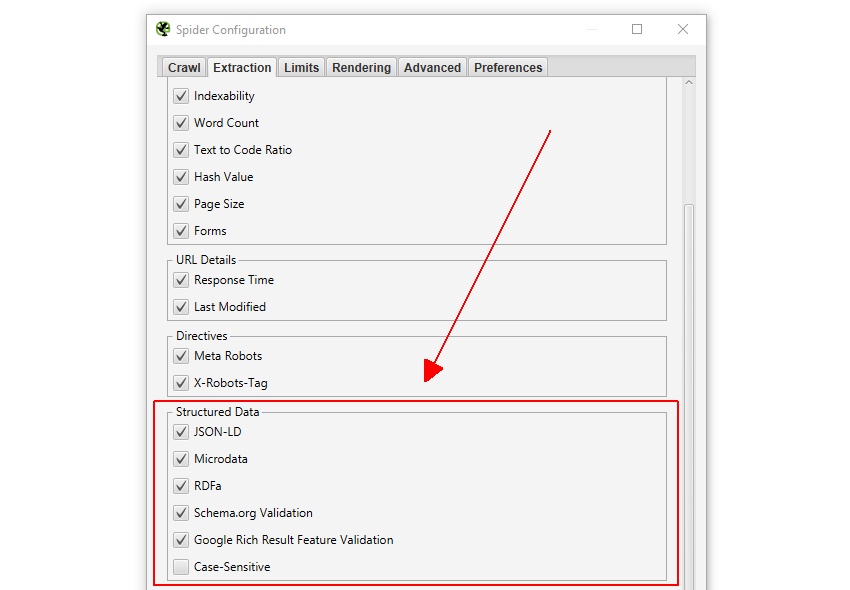
Enable structured data validation under the crawl configuration.
Then use the Structured Data tab to review errors and warnings. Screaming Frog can validate extracted structured data against Schema.org and Google rich-result requirements.
For ecommerce pages, inspect entities such as:
- Product
- Offer
- AggregateRating
- Review
- BreadcrumbList
- Organization
- WebSite
Compare extracted values with visible page information.
Check that:
- Price matches the visible price.
- Currency is correct.
- Availability reflects stock status.
- Product identifiers are present where applicable.
- Reviews belong to the product.
- Breadcrumb markup matches the visible hierarchy.
- Variant markup represents the correct item.
Structured data does not replace crawlability, indexability, or strong content. It helps search engines interpret information already available on the page.
Step 10: Connect PageSpeed Insights
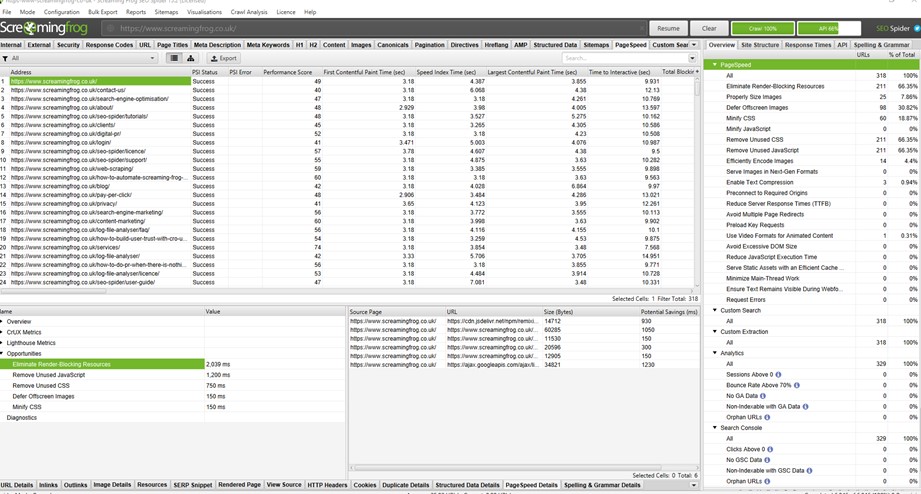
Connect the PageSpeed Insights API through:
Configuration > API Access > PageSpeed Insights
Select the metrics you need and run the crawl.
Screaming Frog’s documented workflow is to connect the API, select metrics, crawl the site, and review the PageSpeed tab.
Group performance findings by template rather than fixing isolated URLs.
Where available, compare Lighthouse laboratory tests with Chrome User Experience Report data, which reflects how real Chrome users experienced the page or origin over the previous reporting period.
Product pages may share oversized gallery images. Category pages may share slow filtering scripts. The checkout may use different third-party resources.
Reviewing Core Web Vitals for stores at template level helps developers fix causes instead of symptoms.
Step 11: Use Custom Extraction for Ecommerce Checks
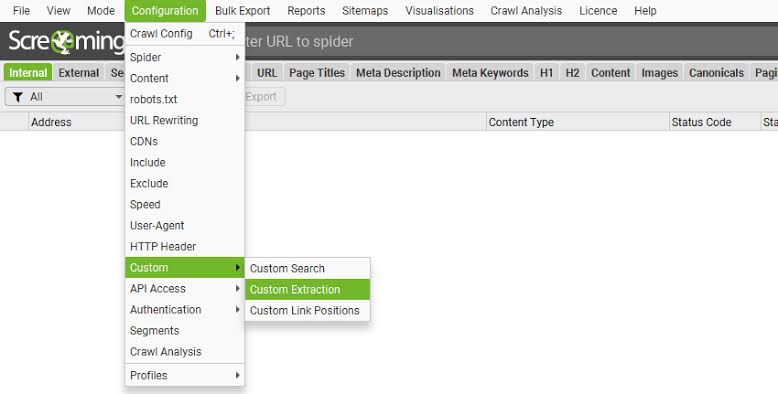
Custom extraction lets you collect page elements using XPath, CSSPath, or regular expressions. It can extract data from raw HTML or rendered HTML.
This feature can audit details that standard reports may not cover.
Useful extractions include:
- Product SKU
- Visible price
- Stock status
- Brand name
- Product count on categories
- Review count
- Delivery message
- Breadcrumb level
- Variant count
- Product description presence
You can then compare extracted fields with titles, structured data, canonicals, status codes, or indexability.
This creates a template integrity audit. It helps detect pages where the technical template works, but commercially important product data is missing or inconsistent.
Step 12: Prioritize Findings by SEO and Revenue Impact
Do not send a raw Screaming Frog export to stakeholders.
Convert issues into actions.
| Priority | Example | Reason |
| Critical | Main categories blocked or noindexed | Prevents strategic pages from appearing |
| High | Product templates canonicalize incorrectly | Can remove large sections from indexation |
| Medium | Internal links pass through redirects | Wastes signals and slows crawling |
| Medium | Product structured data has errors | Limits search-result enhancements |
| Low | Minor title-length differences | Limited impact without duplication or intent issues |
For every issue, record:
- Affected template or URL pattern
- Number of affected URLs
- Example URLs
- SEO impact
- Customer or revenue impact
- Recommended fix
- Responsible owner
- Validation method
A formal technical audit definition helps teams separate diagnosis, implementation, and post-release testing.
How Screaming Frog Supports AI Search Visibility
Google states that AI Overviews and AI Mode may use query fan-out, issuing several related searches across subtopics and data sources.
Screaming Frog cannot guarantee inclusion in an AI-generated result. It can help remove technical barriers that stop useful pages from being discovered, understood, or indexed.
Use the audit to support related search needs around:
- Product specifications
- Product comparisons
- Category selection
- Availability and delivery
- Returns and warranties
- Compatibility
- Materials and sizing
- Brand and model relationships
- Supporting buying guides
The practical goal is complete, connected information not repeating one keyword.
Clear templates, accurate structured data, strong internal links, descriptive headings, and indexable supporting pages give search systems better evidence across related queries.
Run a Screaming Frog Audit Before Scaling SEO
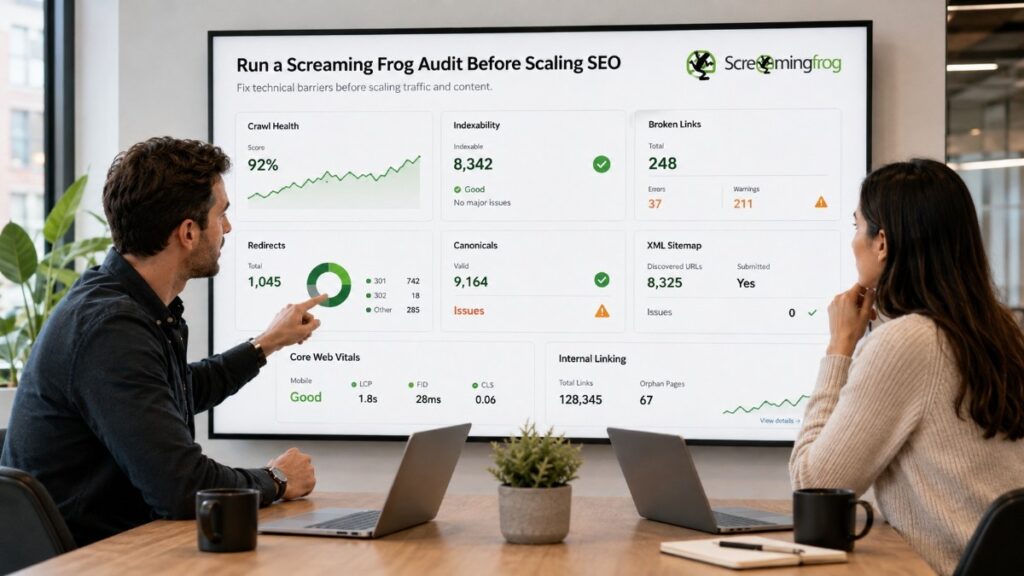
Before investing more in content, backlinks, new categories, or site expansion, use Screaming Frog to check crawl paths, URL parameters, canonicals, indexability, internal linking, structured data, redirects, and page performance.
E-commerce Technical SEO helps store owners, marketing teams, developers, and agencies turn complex crawl data into a focused implementation plan.
Our technical SEO specialists identify the templates and URL patterns holding back product visibility, crawl efficiency, organic traffic, and revenue.
The objective is not to produce another spreadsheet of errors. It is to show what should be fixed first, why it matters, and how to confirm that the correction works.