
Ecommerce category pages often target the most valuable commercial searches on a store.
Queries such as “men’s running shoes,” “oak dining tables,” or “organic skincare products” usually show stronger purchase intent than broad informational searches.
However, many category pages receive fewer internal links than blog posts, product pages, and promotional landing pages. This weakens their position within the site architecture.
Internal linking helps solve this problem.
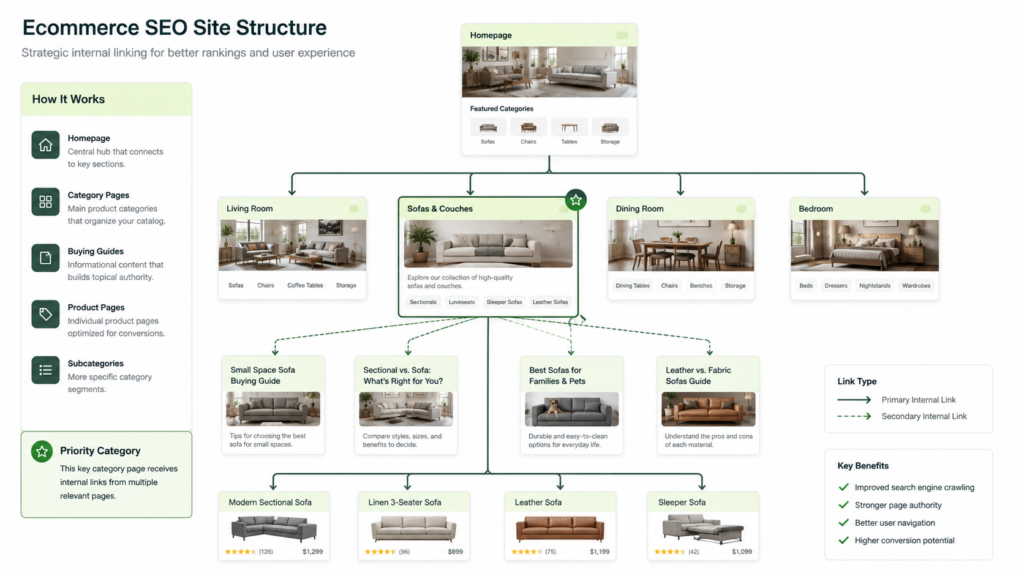
A strong internal linking system makes category pages easier to discover, gives search engines clearer topic signals, distributes authority across the store, and guides shoppers toward relevant products.
The goal is not to add links everywhere. The goal is to create logical paths that connect products, categories, guides, brands, and supporting content.
What Is Internal Linking for Ecommerce Category Pages?
An internal link connects one page on your website to another page on the same domain.
For ecommerce category pages, internal links commonly come from:
- Main navigation menus
- Parent categories
- Subcategory tiles
- Breadcrumbs
- Product pages
- Buying guides
- Blog articles
- Brand pages
- Related category modules
- HTML sitemaps
Google recommends creating crawlable paths from menus to categories, from categories to subcategories, and from subcategories to products. This structure helps Google discover pages and understand their relationship.
A category page should therefore work as both a destination and a distribution hub.
It should receive relevant internal links from stronger pages while passing users and search engines toward useful subcategories and products.
| Internal link source | Typical destination | Main purpose |
| Main navigation | Primary categories | Establish site hierarchy |
| Parent category | Subcategory | Support deeper discovery |
| Product page | Relevant category | Create a return path |
| Buying guide | Commercial category | Connect research with products |
| Breadcrumb | Parent category | Clarify page relationships |
| Related category block | Similar category | Support comparison and discovery |
Why Internal Links Matter for Category Page Rankings
Internal links help search engines answer three important questions:
- Can this page be found?
- What is this page about?
- How important is this page within the website?
When links are planned correctly, they improve crawlability, relevance, hierarchy, and internal authority distribution.
Internal Links Improve Page Discovery
Search engines discover URLs by following crawlable links.
A category page that only appears in an XML sitemap may still be discovered. However, a page with no meaningful internal links can appear isolated from the website’s main structure.
This is especially common with:
- Seasonal categories
- Brand-and-category combinations
- Recently launched collections
- Categories created by merchandising teams
- Categories removed from the main menu
- Pages generated through filtered navigation
A strong crawl path reduces the chance that important categories become orphan pages.
Tools such as Screaming Frog SEO Spider and Sitebulb can identify orphan categories, weak internal link paths, and pages receiving few or no followed internal links.
Before adding more links, check whether crawler access is being limited by navigation rules, directives, or an incorrectly configured ecommerce robots file.
Internal Links Show Page Importance
Not every page on an ecommerce website has equal business value.
A store may have thousands of URLs, but only a smaller group of categories may drive most non-brand organic traffic and revenue.
Internal linking helps communicate this priority.
A category linked from the homepage, main navigation, relevant guides, and related categories will usually appear more important than a category accessible through one buried link.
This does not mean every valuable page must appear in the main menu. It means high-priority pages need several logical paths from trusted and relevant pages.
Internal Links Strengthen Topical Relevance
Search engines use link context and anchor text to understand relationships between pages.
A guide about choosing hiking boots can link to waterproof boots, lightweight boots, and women’s hiking boots. These connections show that the pages belong to the same topic group.
This supports topical authority because the website covers the category through several connected search intents.
| Search intent | Suitable page type | Internal linking role |
| Learn | Guide or article | Introduce the product topic |
| Compare | Comparison page | Connect product options |
| Browse | Category page | Present available products |
| Refine | Subcategory page | Narrow the selection |
| Buy | Product page | Complete the purchase |
This structure also supports query fan-out.
A search engine or AI answer system may examine related questions about materials, sizes, brands, uses, prices, and product types. Connected pages give the system more supporting information across those subtopics.
Internal Links Distribute Internal Authority
Pages earning backlinks or receiving strong internal visibility can pass value to other pages through internal links.
For ecommerce websites, authority often enters through:
- The homepage
- Popular research content
- Digital PR campaigns
- Linkable buying guides
- Brand resources
- High-performing product pages
Internal linking allows that value to move toward commercial category pages.
For example, an authoritative guide about home office ergonomics can link naturally to office chairs, standing desks, monitor arms, and footrests.
The link should be useful to the reader. It should not exist only because the destination page needs stronger rankings.
How Category Pages Should Fit Into Site Architecture
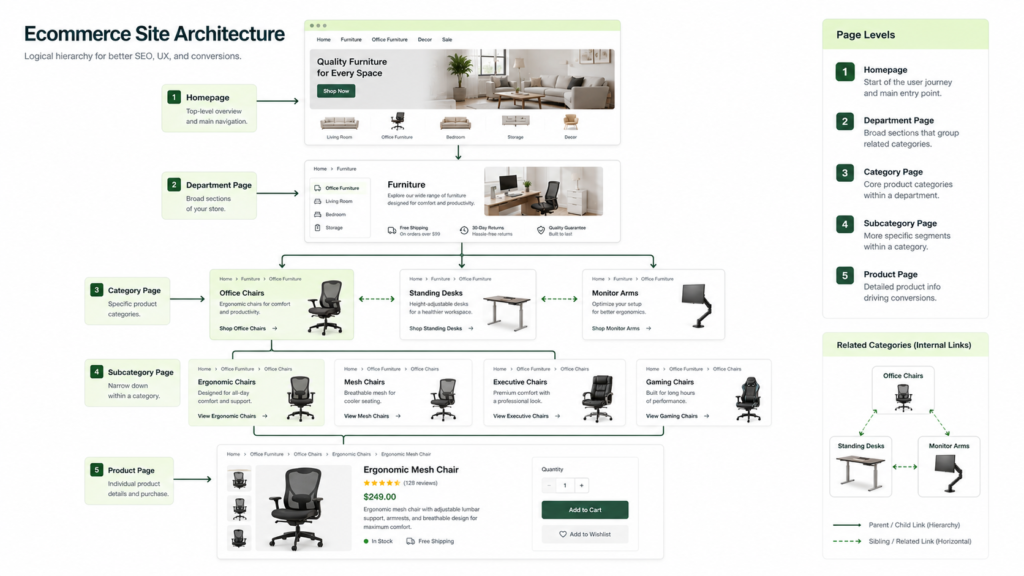
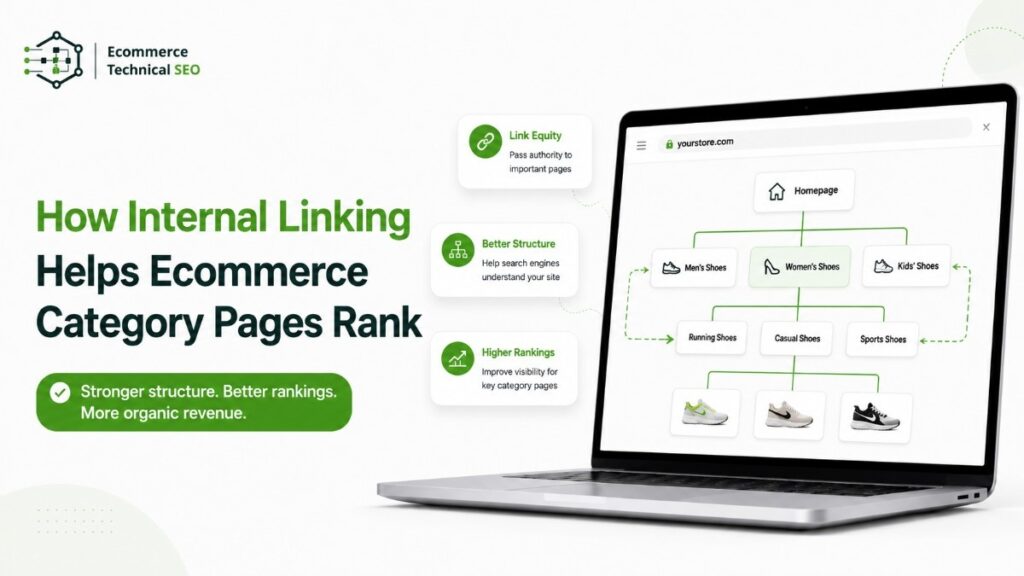
A clear ecommerce architecture usually follows this path:
Homepage → Department → Category → Subcategory → Product
Google does not need the URL itself to show the full hierarchy. It needs consistent links that make the relationships understandable.
A useful architecture keeps high-value categories within a reasonable number of clicks from the homepage.
The exact number is less important than consistency, relevance, and crawl accessibility.
Use Parent-to-Child Links
Parent categories should link to their main subcategories.
A “Furniture” category might link to:
- Living room furniture
- Bedroom furniture
- Dining furniture
- Office furniture
- Outdoor furniture
These links help shoppers narrow their choices while giving search engines a clear hierarchy.
Subcategory links should use visible HTML anchors. Avoid depending entirely on JavaScript interactions that search engines may not consistently process.
Create Child-to-Parent Paths
Products and subcategories should also link back to their parent category.
Breadcrumbs are one of the clearest ways to create this path.
For example:
Home → Women’s Clothing → Dresses → Summer Dresses
Breadcrumbs show hierarchy, improve navigation, and reduce dead ends.
They also help category pages collect internal links from every product or subcategory below them.
Connect Related Categories Horizontally
Not every useful link follows the hierarchy.
Horizontal links connect related pages at the same level.
A category page for laptops may link to:
- Business laptops
- Gaming laptops
- Laptop accessories
- Refurbished laptops
- Computer monitors
These links support query drift because users often adjust their needs after viewing available products.
A shopper searching for a laptop may decide they need a business model, a gaming device, or a lower-priced refurbished option.
The Best Internal Link Sources for Category Pages
Different link sources provide different forms of value.
The strongest strategy combines structural links, contextual links, and merchandising links.
| Link source | SEO value | User value | Recommended use |
| Main navigation | High | High | Core categories |
| Breadcrumbs | High | High | Hierarchy and return paths |
| Blog content | High | Medium | Informational-to-commercial links |
| Product pages | Medium | High | Backlinks to parent categories |
| Related categories | Medium | High | Alternative shopping paths |
| Footer links | Low to medium | Medium | Essential secondary pages |
| Filter links | Variable | High | Only for controlled indexable facets |
Main Navigation Links
Main navigation is best used for broad, high-demand categories.
Do not place every category in the main menu. A crowded menu weakens usability and makes the store hierarchy harder to understand.
Select categories based on:
- Organic search demand
- Revenue contribution
- Inventory depth
- Strategic importance
- Seasonal demand
- User navigation data
The navigation should reflect how customers shop, not only how the internal merchandising team organizes products.
Links From Supporting Content
Informational content can become a strong source of category page links.
A guide should link to a category when the reader is ready to browse products related to the topic.
For example, an article about controlling duplicate URLs may naturally discuss how parameter handling affects crawling across filtered category pages.
Links from informational content should sit near relevant advice rather than inside generic “related links” lists.
Context gives both users and search engines a stronger reason to follow the link.
Links From Product Pages
Product pages should not become dead ends.
Each product should link back to its main category through breadcrumbs or another clear navigational element.
Additional links may connect to:
- Compatible products
- Alternative product types
- Parent brands
- Relevant accessories
- Replacement products
- Buying guides
These links support shoppers who decide the current product is not suitable.
They can also help protect category visibility when products are discontinued, redirected, or temporarily unavailable.
How to Choose Anchor Text
Anchor text describes the linked destination.
Good ecommerce anchor text is concise, specific, and useful within the sentence.
Avoid repeated exact-match anchors across every page. Repetition can make the copy feel mechanical and may provide less contextual diversity.
Use natural variations instead.
| Weak anchor text | Better anchor text | Reason |
| Click here | waterproof hiking boots | Describes the destination |
| Learn more | category crawl issues | Adds topical context |
| Products | lightweight running shoes | Clarifies product type |
| This page | technical audit process | Explains the linked resource |
| Best shoes online | men’s trail shoes | Avoids promotional wording |
Anchor text should normally describe the category without forcing the full target keyword into every link.
Good variations for a running shoe category might include:
- Running shoes
- Shoes for runners
- Road running footwear
- Performance running styles
- Men’s running options
The surrounding sentence also matters.
Google recommends using descriptive, concise anchor text and placing links within relevant context.
Internal Linking for Faceted Navigation
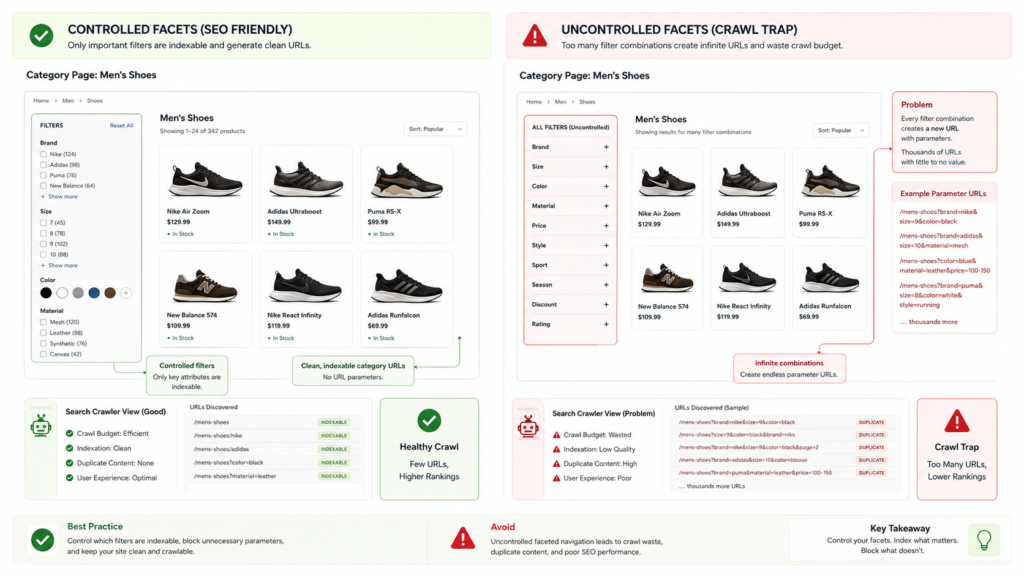
Faceted navigation is one of the most difficult internal linking areas in ecommerce SEO.
Filters can create useful shopping pages for attributes such as:
- Brand
- Size
- Color
- Material
- Price
- Product feature
- Compatibility
- Customer type
However, filters can also generate thousands of low-value URL combinations.
Examples include:
- Black leather office chairs
- Black leather chairs under $200
- Black leather chairs under $200 sorted by rating
- Black leather chairs under $200 with free shipping
Allowing every combination to become crawlable and indexable can waste crawl resources and create duplicate or near-duplicate pages.
Decide Which Facets Deserve Internal Links
A facet should usually receive crawlable internal links only when it has:
- Clear search demand
- A distinct product set
- Stable inventory
- Unique search intent
- A self-canonical URL
- Useful on-page content
- A place in the wider category structure
The difference between a crawlable URL and an indexable URL is important here. A page may be accessible to search engines without being suitable for indexing.
A clear understanding of crawlability and index coverage helps prevent valuable category links from pointing into uncontrolled URL spaces.
Common Ecommerce Internal Linking Mistakes
Adding more links does not automatically improve rankings.
Poor implementation can confuse users, create crawl traps, or distribute attention toward low-value pages.
Linking to Parameter URLs
Internal links should normally point to clean canonical URLs.
Avoid using tracking parameters, session IDs, sort parameters, or unnecessary filter values inside internal links.
A clean link:
/mens-running-shoes/
A weaker internal link:
/mens-running-shoes/?source=blog&sort=popular
The parameter version may create duplicate crawl paths and split internal signals between URL variations.
Linking Only From the Footer
Footer links can support discovery, but they should not be the only links pointing to an important category.
A page linked only from the footer may appear secondary within the site structure.
High-priority categories should receive links from relevant navigation, content, parent categories, or related modules.
Adding Too Many Category Links
A long list of hundreds of links is difficult for shoppers to use.
It can also reduce the contextual value of each link.
Prioritize links based on:
- User need
- Topic relevance
- commercial importance
- Inventory availability
- Search opportunity
Using JavaScript-Only Links
Important category links should be rendered as standard crawlable HTML anchors.
JavaScript can improve the experience, but it should not be the only method used to expose essential navigation.
This is especially important for infinite scrolling, carousels, mega menus, and dynamically loaded subcategory blocks.
Linking to Redirects or Broken Pages
Internal links should point directly to the final working URL.
Links passing through redirects create unnecessary crawl steps. Broken links interrupt user journeys and waste internal authority.
A recurring technical SEO audit should identify redirect chains, broken links, orphan categories, and links to non-canonical URLs.
A Practical Category Page Internal Linking Process
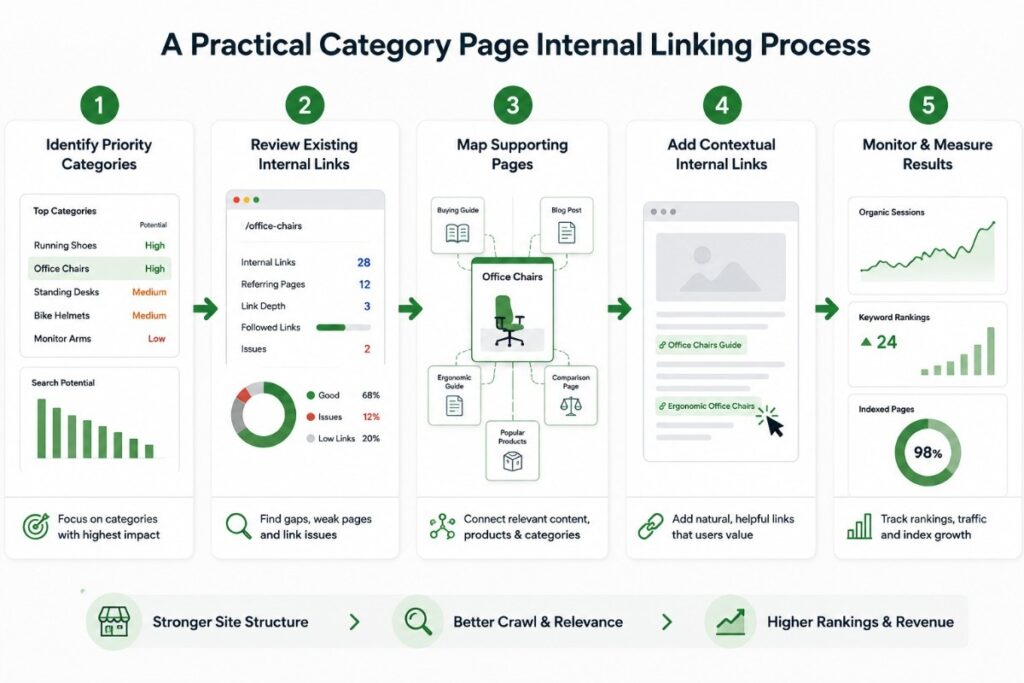
Use a simple process rather than trying to redesign the entire website at once.
Step 1: Identify Priority Categories
Select categories that matter most to organic performance.
Use:
- Revenue data
- Search demand
- Conversion rate
- Product margin
- Search Console impressions
- Inventory availability
- Business priorities
Step 2: Review Existing Internal Links
Crawl the website and measure:
- Number of internal links received
- Link sources
- Anchor text
- Click depth
- Redirected links
- Broken links
- Orphan pages
- Canonical destination
A category with strong demand but few relevant internal links is a clear improvement opportunity.
Step 3: Map Supporting Pages
Find pages that naturally relate to each category.
These may include guides, products, brands, FAQs, comparison pages, and parent categories.
Do not link from every page mentioning one matching word. The source page should support the destination’s topic and user intent.
Step 4: Add Links Where They Help Users
Place links inside relevant content, navigation elements, subcategory tiles, breadcrumbs, and product modules.
Keep each link useful and understandable without relying on SEO knowledge.
Step 5: Monitor the Result
Track performance after implementation.
Review:
- Organic impressions
- Average ranking position
- Non-brand clicks
- Crawl frequency
- Indexed category count
- Category revenue
- Product discovery
- User paths
Use Google Search Console to compare category impressions, clicks, average positions, and index coverage after important internal linking changes.
Internal linking changes may not produce immediate ranking gains. Search engines need time to recrawl the updated source pages and process the new relationships.
How Internal Linking Supports AI Overviews and AEO
AI-driven search systems often need information from several connected pages before forming an answer.
A category page may satisfy the commercial part of a query, while supporting articles answer questions about sizing, materials, brands, use cases, maintenance, or product selection.
Internal links connect these entities into a clear topical system.
For stronger AI search visibility:
- Answer one clear intent per page
- Connect related informational and commercial pages
- Use descriptive headings
- Define technical terms directly
- Keep important facts in short paragraphs
- Use comparison tables where useful
- Avoid unrelated sections
- Maintain consistent category naming
This approach improves information density without turning one category page into a long guide covering every possible topic.
Run a Technical SEO Audit Before Scaling Content or Backlinks
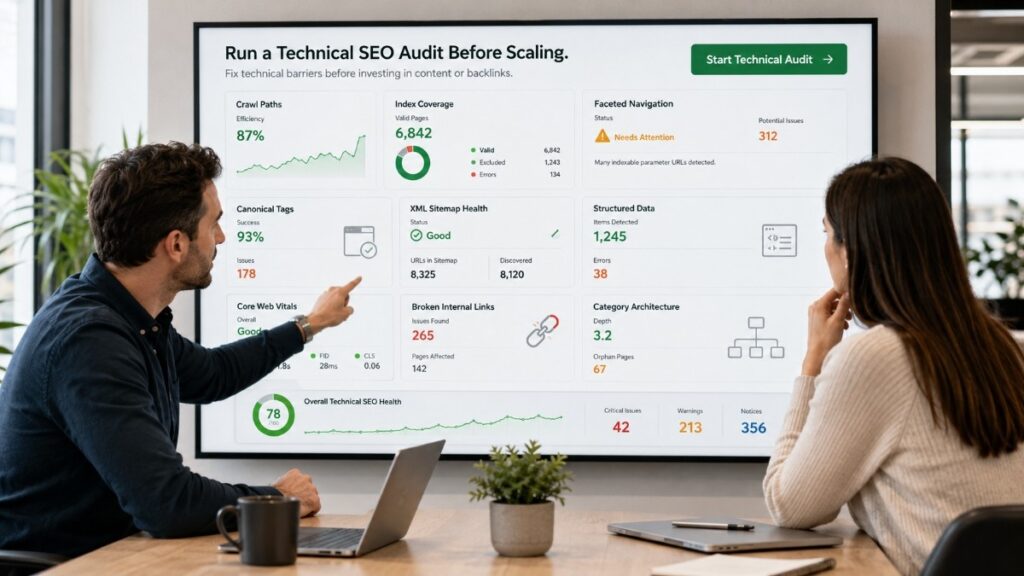
Internal linking works best when the technical foundation is reliable. Before scaling SEO, run an audit that checks crawl paths, index coverage, faceted navigation, canonical tags, sitemaps, structured data, page performance, and category architecture.
An ecommerce audit checklist helps identify whether key category pages are properly supported or getting lost behind filters, parameters, scripts, and weak internal navigation.
A structured audit gives you a clear baseline before investing in content, backlinks, or expansion. It ensures your category pages are discoverable, indexable, and correctly connected within the site.
E-commerce Technical SEO focuses on fixing these structural issues so search engines can efficiently crawl, understand, and rank your most important commercial pages.