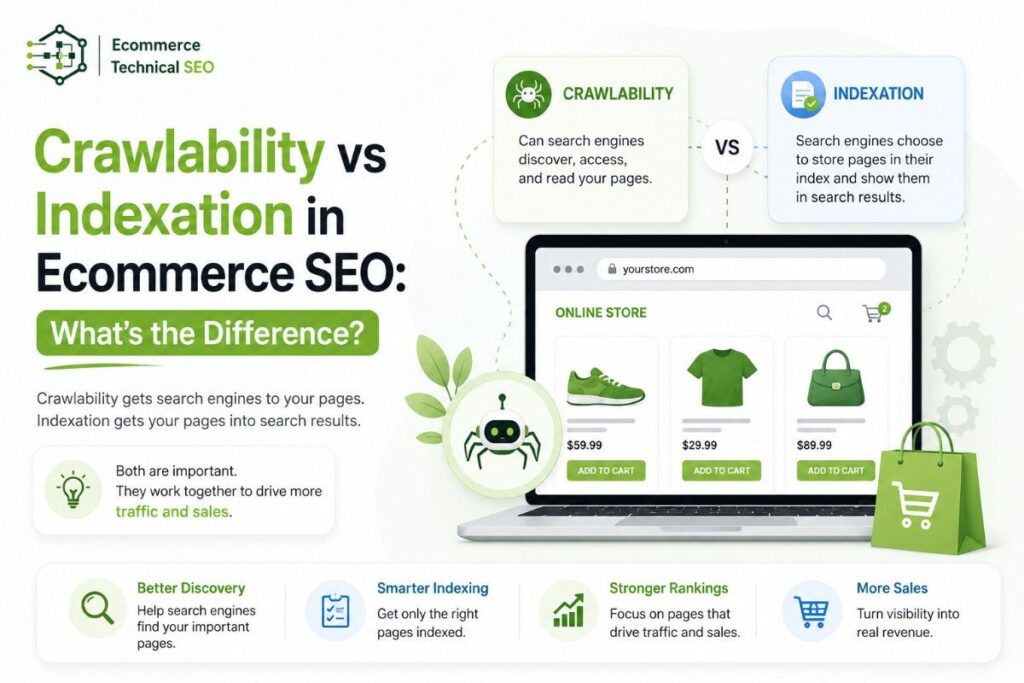

Crawlability and indexation are two different parts of ecommerce SEO. They work together, but they do not mean the same thing.
Crawlability means search engines can discover, access, and read your URLs. Indexation means search engines choose to store those URLs in their index so they can appear in search results.
For ecommerce websites, this difference matters a lot. A store can have thousands of product, category, filter, variant, and pagination URLs. Google may crawl many of them, but only a smaller group should be indexed.
The goal is not to get every URL indexed. The goal is to make sure your most valuable pages are easy to crawl, eligible to index, and strong enough to rank.
Crawlability vs Indexation
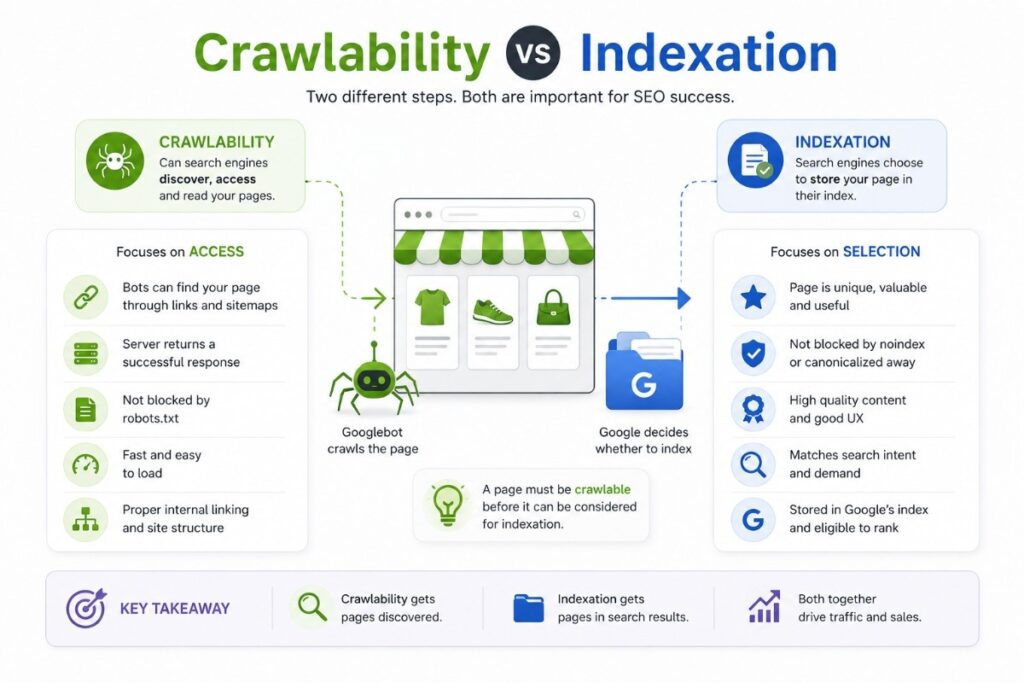
Crawlability is about access. Indexation is about selection.
A page must usually be crawlable before Google can fully understand it. But being crawlable does not guarantee indexation. Google still has to decide whether the page is useful, unique, canonical, and worth showing in search.
| SEO concept | Simple meaning | Ecommerce example | Main business impact |
| Crawlability | Can bots reach and read the page? | Googlebot can access /mens-running-shoes/ | Important pages get discovered |
| Indexation | Did Google store the page for search? | The category page appears in Google’s index | Page can earn rankings and traffic |
| Crawl budget | How much crawling Google can and wants to spend | Google crawls filters instead of products | Product discovery slows down |
| Index bloat | Too many weak URLs are indexed | Sort, filter, and duplicate URLs appear in search | Ranking signals get diluted |
A clean crawl and index setup is part of a strong technical SEO foundation because it helps search engines focus on pages that can actually drive revenue.
What Is Crawlability in Ecommerce SEO?
Crawlability is the ability of search engine bots to access your pages.
For ecommerce websites, crawlability depends on:
- Internal links from menus, categories, breadcrumbs, and related products
- Clean URL structures
- Server response codes
- Robots.txt rules
- JavaScript rendering
- Page speed and server stability
- XML sitemaps
- Pagination and faceted navigation setup
A page with strong crawlability is easy for bots to find and fetch. A page with poor crawlability may be hidden too deep, blocked, broken, or only reachable through scripts that bots struggle to process.
When a store grows, crawlability becomes harder to control. A small Shopify store may have 200 important URLs. A large WooCommerce or custom ecommerce site may generate hundreds of thousands of URLs from filters, search pages, tags, collections, and product variants.
That is why crawlability should be reviewed during a proper SEO audit process before scaling new content or link building.
Common Crawlability Problems
| Problem | What happens | Ecommerce risk |
| Important pages are not linked | Bots do not find them easily | Products stay undiscovered |
| Robots.txt blocks key folders | Bots cannot crawl pages | Categories or products lose visibility |
| Slow server responses | Bots reduce crawl activity | New products take longer to appear |
| Infinite filter URLs | Bots waste time on weak pages | Crawl budget is drained |
| Broken internal links | Bots hit 404 pages | Crawl paths become inefficient |
| JavaScript-only links | Bots may not follow key links | Products become harder to discover |
Crawlability is not only a search engine issue. If bots struggle to move through your site, users may also struggle with navigation, filters, and product discovery.
What Is Indexation in Ecommerce SEO?
Indexation is the process where Google stores a page in its search index.
A page can only earn organic traffic from Google if it is indexed and eligible to appear for relevant searches. But Google does not index every crawlable page.
For ecommerce sites, Google may skip pages that are:
- Duplicate or near-duplicate
- Thin or low value
- Canonicalized to another URL
- Marked with noindex
- Blocked from crawling before Google can see the noindex tag
- Soft 404 pages
- Out-of-stock pages with no useful content
- Filter pages with no unique search demand
- Internal search result pages
Indexation is not just a technical permission. It is also a quality decision.
A product page with original copy, clear images, reviews, price, availability, internal links, and valid structured data has a stronger chance of being indexed than a thin product page copied from a supplier feed.
A deeper ecommerce technical SEO audit complete guide can help separate pages that deserve indexation from pages that only waste crawl and ranking signals.
Crawlability vs Indexation: The Core Difference
The easiest way to understand the difference is this:
Crawlability asks: “Can Google access this URL?”
Indexation asks: “Should Google store and show this URL?”
| Scenario | Crawlable? | Indexable? | What it means |
| Product page returns 200 status and has no noindex | Yes | Usually yes | Good candidate for search |
| Filter URL blocked in robots.txt | No | Not reliably | Google cannot crawl the content |
| Page has meta noindex | Yes | No | Google can crawl it but should not index it |
| Duplicate product canonicalized to main product | Yes | Usually no | Signals point to preferred URL |
| 404 product page | No useful crawl | No | Page should be removed or redirected |
| Orphan collection page | Technically yes if known | Weak | Google may not find or value it |
This is where many ecommerce teams make mistakes. They use robots.txt when they need noindex. They use noindex when they need canonical tags. Or they allow every filter URL to be crawled and indexed, even when those pages have no search value.
Why This Matters More for Ecommerce Websites
Ecommerce sites have more URL risk than most websites.
A blog may publish one article at a time. An ecommerce store may create hundreds of URLs from one category page because of filters for color, size, brand, price, rating, material, and sorting.
For users, filters are helpful. For search engines, filters can be messy.
A category like /women-dresses/ may create URLs such as:
- /women-dresses/?color=black
- /women-dresses/?size=m
- /women-dresses/?sort=price-low
- /women-dresses/?color=black&size=m&sort=price-low
- /women-dresses/?brand=x&material=linen&price=50-100
Some filtered pages may have search demand. “Black linen dresses” could deserve an indexable landing page. But “black dresses sorted by price low to high” usually does not.
The job is to choose which URLs should be crawlable, indexable, canonicalized, blocked, or noindexed.
Which Ecommerce Pages Should Be Indexed?
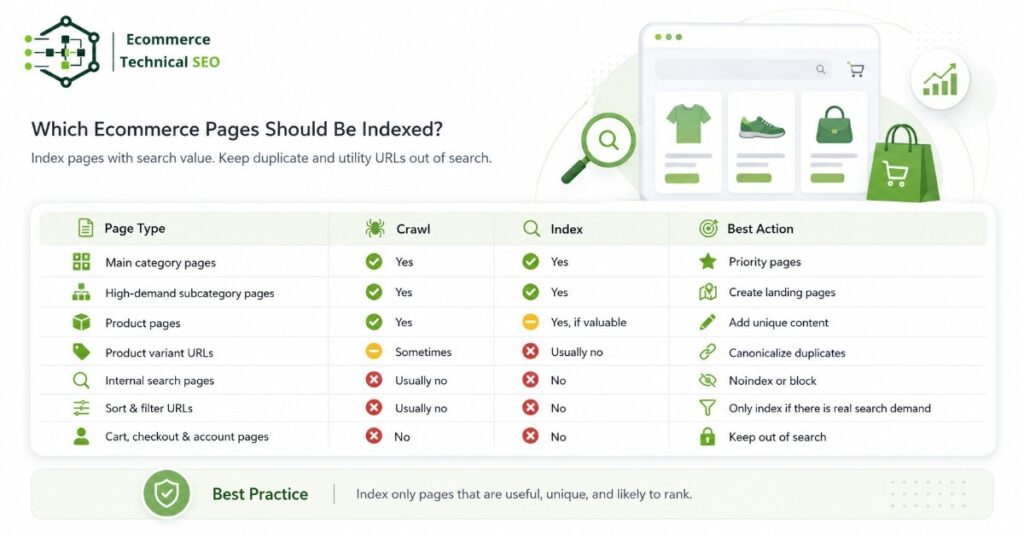
Not every page in your store belongs in Google.
Use this table as a simple decision guide.
| Page type | Should it be crawlable? | Should it be indexed? | Recommendation |
| Main category pages | Yes | Yes | Build unique copy, links, and clean filters |
| High-demand subcategory pages | Yes | Yes | Create stable landing pages |
| Product pages | Yes | Yes, if valuable | Add unique content, schema, and reviews |
| Product variant URLs | Sometimes | Usually no | Canonicalize unless variants have search demand |
| Internal search pages | Usually no | No | Block or noindex based on setup |
| Sort parameters | Usually no | No | Block crawling or canonicalize |
| Cart, checkout, account pages | No | No | Keep out of search |
| Expired products | Sometimes | Usually no | Redirect, keep live, or noindex based on demand |
Use an audit checklist to review these page groups at scale instead of checking random URLs one by one.
Crawlability Controls vs Indexation Controls
One of the biggest mistakes in ecommerce SEO is using the wrong control.
Robots.txt, noindex, canonical tags, redirects, and sitemaps all do different jobs.
| Control | Main purpose | Best used for | Common mistake |
| Robots.txt | Controls crawling | Blocking low-value crawl paths | Using it to remove indexed pages |
| Meta noindex | Controls indexation | Keeping crawlable pages out of search | Blocking the page before Google sees noindex |
| Canonical tag | Consolidates duplicates | Similar products, variants, filtered URLs | Treating it as a strict command |
| 301 redirect | Moves users and bots | Discontinued products with replacements | Redirecting everything to the homepage |
| XML sitemap | Helps discovery | Important indexable URLs | Including blocked or noindex URLs |
Robots.txt is a crawl control. Noindex is an index control. Canonical is a consolidation signal. A sitemap is a discovery signal.
They are not interchangeable.
How to Diagnose Crawlability Problems
Start with the pages that should make money: category pages, product pages, and high-intent collection pages.
Check whether Google can find and crawl them.
Crawlability Checks
- Are important pages linked from categories, menus, breadcrumbs, or HTML links?
- Do they return a 200 status code?
- Are they blocked in robots.txt?
- Are important links visible in rendered HTML?
- Are canonical tags pointing to the correct URL?
- Are pages included in the XML sitemap?
- Are server errors or timeouts showing in crawl logs?
- Are filters creating too many crawlable URL combinations?
Performance also affects crawl efficiency. Slow pages and unstable servers can reduce how much search engines crawl. For stores with large catalogs, faster ecommerce pages help both bots and shoppers move through the site with less friction.
How to Diagnose Indexation Problems
Indexation problems show up when pages are crawlable but missing from Google.
Use Google Search Console, site crawls, and log files to compare:
- URLs submitted in sitemaps
- URLs crawled by Googlebot
- URLs indexed by Google
- URLs getting impressions
- URLs marked duplicate, crawled but not indexed, or discovered but not indexed
Indexation Diagnosis Table
| Symptom | Likely cause | Practical fix |
| Crawled, currently not indexed | Low quality, duplication, weak demand | Improve content, links, and uniqueness |
| Discovered, currently not indexed | Low crawl priority or crawl budget issue | Strengthen internal links and reduce crawl waste |
| Duplicate, Google chose different canonical | Conflicting canonical signals | Align canonicals, internal links, and sitemaps |
| Excluded by noindex | Page has noindex tag | Remove noindex if the page should rank |
| Blocked by robots.txt | Google cannot crawl page content | Unblock if the page should be evaluated |
| Soft 404 | Page looks empty or unhelpful | Add value, redirect, or return true 404 |
For product pages, structured data can also improve machine understanding. Clean product schema markup helps Google read details like price, availability, reviews, SKU, and offers.
Competitor Gap Analysis: What Most Pages Miss
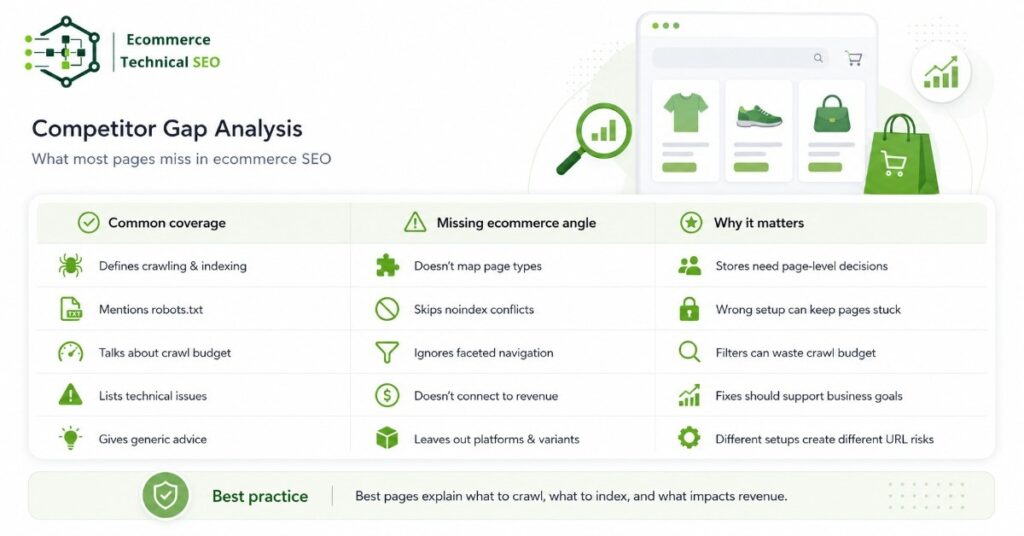
Many articles explain crawlability and indexability at a basic level. That is useful, but ecommerce sites need a more practical framework.
Here are the missing entities and insights this content should cover to compete better in AI Overviews and answer engines.
| Common competitor coverage | Missing ecommerce angle | Why it matters |
| Defines crawling and indexing | Does not map page types | Store owners need page-level decisions |
| Mentions robots.txt | Does not explain noindex conflict | Wrong setup can keep pages stuck |
| Talks about crawl budget | Ignores faceted navigation | Filters are a major crawl trap |
| Lists technical issues | Does not connect to revenue | SEO fixes need business priority |
| Mentions sitemaps | Does not compare sitemap vs canonical signals | Mixed signals hurt indexation clarity |
| Gives generic advice | Does not include Shopify, WooCommerce, or variants | Platforms create different URL risks |
The strongest content should answer the main question and the follow-up questions a user would ask next.
Practical Ecommerce Examples
Example 1: A Product Page Is Crawlable but Not Indexed
A new product page is live. It returns 200 status. It is in the sitemap. Google crawls it, but it does not appear in search.
Possible reasons:
- The description is copied from the supplier
- The page has no reviews or unique details
- The product is too similar to another variant
- The canonical points to a parent product
- Internal links are weak
- The product is out of stock
Fix the indexation issue by improving uniqueness, strengthening internal links, checking canonical tags, and adding useful product details.
Example 2: A Filter URL Is Crawlable and Indexed by Mistake
A filter URL like /shoes/?sort=price-low appears in Google.
This page does not target a real search query. It duplicates the main category and changes only the order of products.
Fix it by preventing low-value sort URLs from being crawled or indexed. Keep the main category indexable and use canonical tags carefully where duplicate filter URLs are still accessible.
Example 3: A Category Page Is Not Crawled Often
A high-value category page exists, but Google rarely crawls it.
Possible reasons:
- It is buried too deep in the site
- It has few internal links
- It is missing from the sitemap
- The server is slow
- Crawl budget is wasted on filters
- Pagination creates poor discovery paths
Fix it by linking from the main navigation, adding breadcrumb paths, including it in the sitemap, and reducing crawl waste from low-value URLs.
Best Practices for Ecommerce Crawlability and Indexation
Use these rules to keep your store clean.
Crawlability Best Practices
- Link to important categories and products through HTML links
- Keep key pages within a few clicks from the homepage
- Maintain clean XML sitemaps
- Reduce crawl traps from filters, search pages, and sort parameters
- Fix 404s, redirect chains, and server errors
- Avoid blocking CSS or JavaScript needed for rendering
- Improve page speed and server response times
Indexation Best Practices
- Index only pages with search value
- Noindex thin, duplicate, or utility pages when needed
- Canonicalize duplicate product and variant URLs
- Keep canonical URLs in sitemaps
- Add unique copy to category and product pages
- Use structured data that matches visible content
- Review Search Console index reports regularly
The best ecommerce SEO setups are selective. They do not push every URL into Google. They guide Google toward the pages most likely to rank, convert, and support revenue.
A Simple Decision Framework
Before changing crawl or index rules, ask five questions.
| Question | If yes | If no |
| Does this page target real search demand? | Consider indexing | Keep out of index |
| Is the content unique and useful? | Strengthen links and schema | Improve or consolidate |
| Should users land here from Google? | Make it indexable | Noindex or block |
| Does this URL duplicate another page? | Canonicalize or merge | Keep separate |
| Does crawling this URL waste resources? | Block or reduce crawl paths | Allow crawling |
This keeps decisions simple. Pages that help users search, compare, and buy should be easy to crawl and index. Pages that only create duplication should stay out of Google’s way.
Final Takeaway
Crawlability and indexation are connected, but they solve different problems.
Crawlability helps search engines reach your ecommerce pages. Indexation decides whether those pages can appear in search results.
For ecommerce SEO, the real skill is control. You want Googlebot spending time on valuable product, category, and collection pages, not endless filters, duplicate variants, internal search pages, or sort URLs.
A healthy store gives search engines clear paths, clean signals, fast pages, useful content, and structured product data. That improves crawl efficiency, index coverage, rankings, product visibility, and organic revenue.
Run a Technical SEO Audit Before Scaling Content or Backlinks
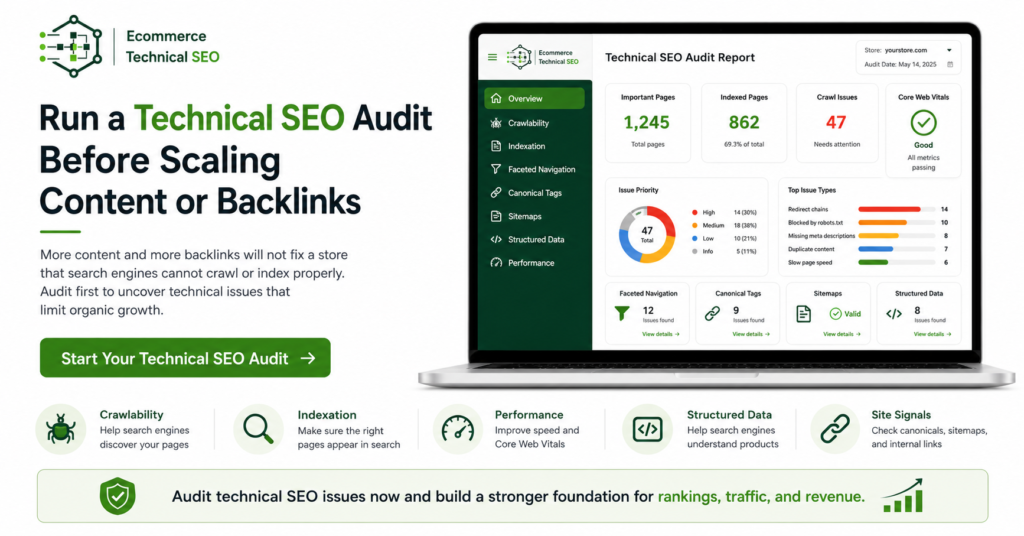
More content and more backlinks will not fix a store that search engines cannot crawl or index properly.
Before scaling SEO, run a technical audit that checks crawl paths, index coverage, faceted navigation, product pages, canonical tags, sitemaps, structured data, and performance.
Ecommerce Technical SEO helps store owners, marketing teams, developers, and agencies find the technical issues that hold back organic growth. The goal is simple: make important pages easier for search engines to find, understand, index, and rank.
A clear technical SEO review gives your store a stronger base before you invest more time and budget into content, links, or site expansion.