


A robots.txt file can look correct and still create major ecommerce SEO problems.
One incorrect rule can block product pages, category pages, product images, JavaScript resources, or valuable filtered pages. At the same time, weak rules can allow crawlers to spend resources on internal search, cart URLs, account pages, tracking parameters, and endless filter combinations.
Robots.txt testing tools help you check these rules before they affect organic visibility.
For ecommerce sites, the best approach is not simply finding a syntax error. You need to understand which URLs are blocked, which crawler is affected, and whether those URLs should be crawlable in the first place.
What Are the Best Robots.txt Testing Tools for Ecommerce SEO?
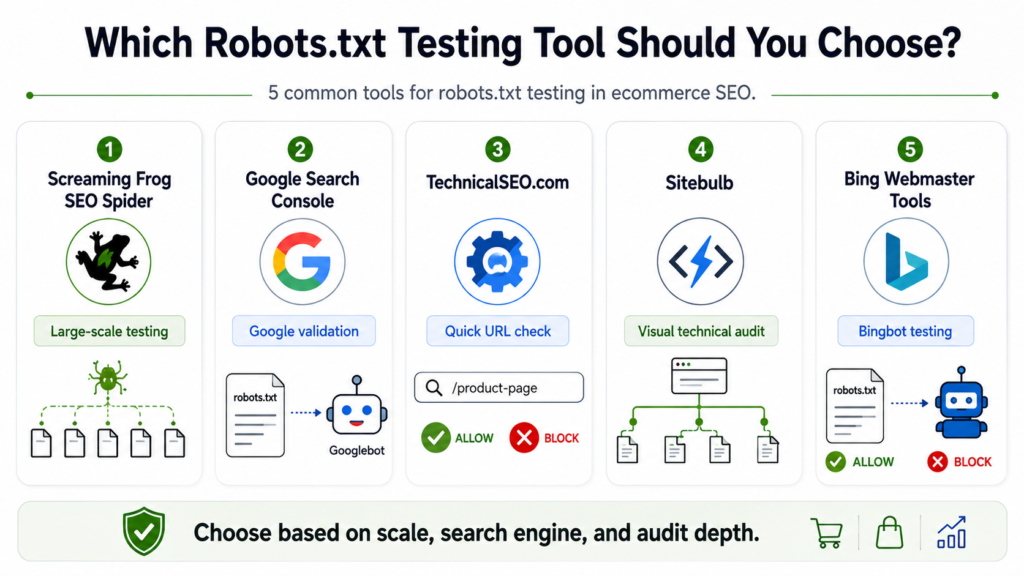
For most ecommerce SEO audits, Screaming Frog SEO Spider is the strongest overall robots.txt testing tool because it lets you test rules against large URL sets and simulate changes before publishing them.
Google Search Console is better for confirming how Google sees your live robots.txt file. TechnicalSEO.com works well for quick URL-level checks. Sitebulb provides useful visual auditing, while Bing Webmaster Tools helps validate rules specifically for Bing.
| Tool | Best For | Ecommerce Strength | Best User |
| Screaming Frog | Large-scale testing | Tests many ecommerce URLs against custom rules | SEOs, developers, agencies |
| Google Search Console | Google validation | Confirms Google’s access to live robots.txt | Store owners, SEO teams |
| TechnicalSEO.com | Quick testing | Fast rule and URL validation | Marketers, SEOs |
| Sitebulb | Visual technical audits | Connects crawl restrictions with site architecture | SEO teams |
| Bing Webmaster Tools | Bing validation | Tests Bingbot access | Multi-search-engine SEO |
| Spotibo | Quick Google-style checks | Useful for individual rules and monitoring | Smaller SEO teams |
The right tool depends on whether you are planning rules, testing them at scale, or validating the live implementation.
Why Robots.txt Testing Matters More for Ecommerce Sites
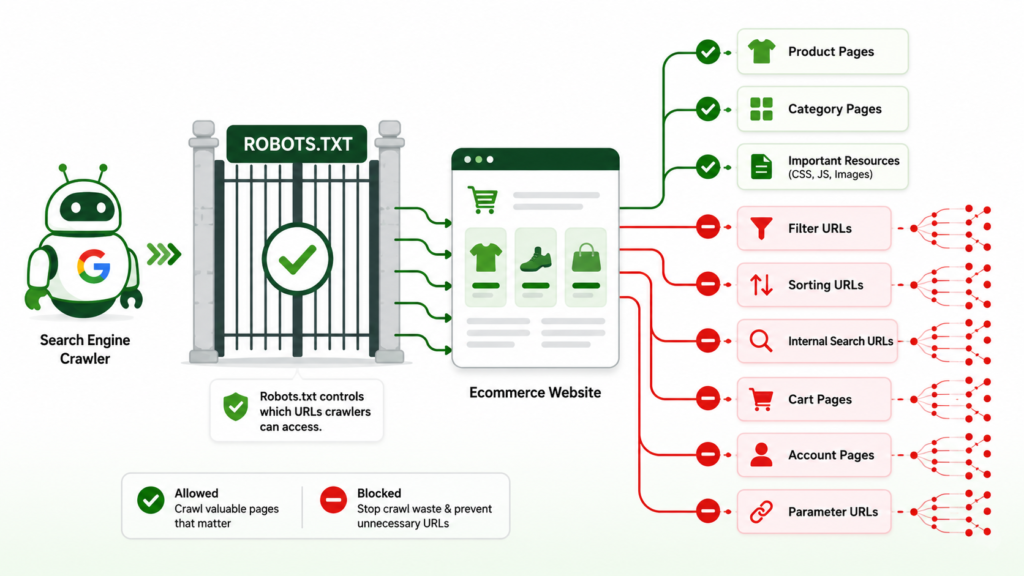
Ecommerce websites generate far more URL variations than most standard websites. Filters, sorting options, internal search, session IDs, tracking parameters, pagination, product variants, wish lists, carts, and account pages can multiply a catalog of 20,000 products into hundreds of thousands of crawlable URLs.
Google specifically recommends controlling unnecessary faceted navigation crawling when those URLs do not need to appear in search.
Understanding robots.txt for ecommerce SEO therefore requires more than adding several Disallow lines.
You must test whether your rules protect crawl efficiency without blocking URLs that support rankings, discovery, rendering, products, or categories.
Robots.txt also controls crawling, not guaranteed index removal. A blocked URL can sometimes remain indexed if Google discovers it elsewhere.
That distinction between crawlability and indexation in ecommerce SEO is critical when diagnosing blocked URLs.
Which Ecommerce URLs Should You Test?
Do not test only your homepage and one product URL.
Build a small representative URL set covering every important ecommerce template and URL pattern.
| URL Type | Example | Typical Crawl Decision | Main Risk |
| Product | /products/blue-shirt/ | Allow | Lost product visibility |
| Category | /mens/shirts/ | Allow | Lost commercial rankings |
| Filter | ?color=blue&size=m | Depends | Crawl explosion |
| Sort | ?sort=price | Often restrict | Duplicate crawling |
| Search | /search?q=shirt | Often restrict | Infinite low-value URLs |
| Cart | /cart/ | Usually restrict | Crawl waste |
| Account | /account/ | Usually restrict | No search value |
| Pagination | ?page=2 | Depends | Discovery problems |
| Product variant | ?variant=123 | Depends | Duplicate or missing products |
| CSS/JavaScript | /assets/app.js | Usually allow | Rendering problems |
The important word is depends.
A filter generating valuable landing pages may need to remain crawlable. The same parameter creating millions of near-duplicate combinations may need stronger control.
That is why controlling ecommerce URL parameters should be part of the robots.txt decision, not a separate afterthought.
1. Screaming Frog SEO Spider: Best Overall Robots.txt Testing Tool
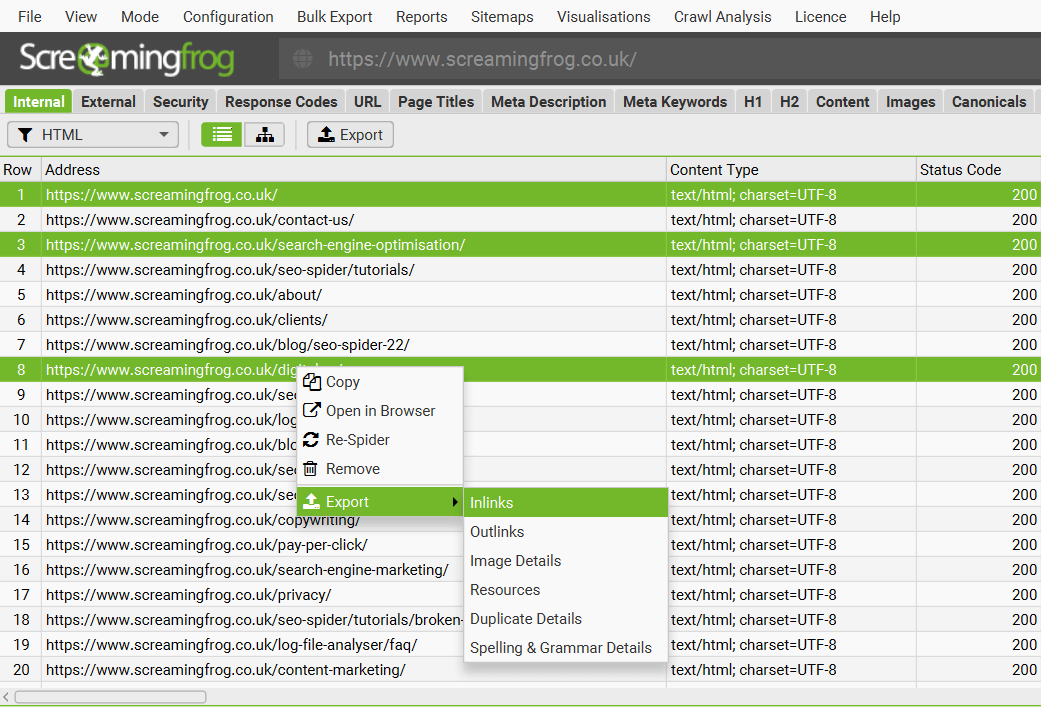
Screaming Frog is the best choice when you need to understand the site-wide impact of robots.txt rules.
Its SEO Spider can identify URLs blocked by robots.txt during a crawl. More importantly, its custom robots.txt functionality lets you modify rules and test them before changing the live file.
This is especially useful for ecommerce sites.
You could test a proposed rule such as:
Disallow: /*?sort=
Then crawl the store and check what becomes inaccessible.
This is safer than publishing the rule first and discovering later that the same parameter structure is used by an important product or category template.
Where Screaming Frog Is Most Useful
Use it when you need to:
- Test thousands of URLs together.
- Simulate proposed robots.txt changes.
- Find existing robots-blocked URLs.
- Compare blocked URLs against internal links.
- Audit category and product crawl paths.
- Investigate parameter-heavy ecommerce sites.
- Check crawl directives alongside canonicals and meta robots.
Screaming Frog’s custom robots.txt testing is particularly valuable during migrations, platform changes, faceted-navigation projects, and large technical cleanups.
A broader Screaming Frog audit before scaling ecommerce SEO can reveal whether robots.txt is only one part of a larger crawl problem.
2. Google Search Console Robots.txt Report: Best for Google Validation

Google Search Console should be part of every robots.txt audit because it shows whether Google can process the robots.txt files it finds for your property.
The current robots.txt report can show discovered files, crawl information, warnings, and errors.
Its main advantage is authority.
You are checking Google’s understanding rather than relying entirely on a third-party crawler.
However, Search Console should not replace a crawler for large ecommerce testing.
Use it to validate production. Use tools such as Screaming Frog to understand the wider impact across thousands of URLs.
If crawl and indexing reports show continuing problems, a structured Google Search Console error fixing process for ecommerce can help connect robots restrictions with wider indexing issues.
3. TechnicalSEO.com Robots.txt Tester: Best for Fast URL Checks
TechnicalSEO.com’s robots.txt validator is useful when you need a fast answer to a specific question:
Can this crawler access this URL?
The tool can test and validate robots.txt rules, identify whether a URL is blocked, and check blocked page resources.
This makes it useful during development discussions.
Instead of running a complete crawl, a developer or SEO can quickly test a suspicious rule against several example URLs.
It is less suitable than Screaming Frog for understanding the effect across a large ecommerce catalog.
4. Sitebulb: Best for Visual Technical SEO Auditing
Sitebulb is useful when robots.txt needs to be analyzed as part of a wider technical SEO audit.
Its ecommerce guidance recommends testing robots.txt rules before deployment, and its crawler can emulate a virtual robots.txt configuration.
The major advantage is context.
A blocked page may also have internal-link, canonical, rendering, indexability, or architecture problems.
Sitebulb helps SEO teams investigate those relationships without treating robots.txt as an isolated file.
For teams reviewing several technical systems together, this fits naturally within broader technical SEO audits.
5. Bing Webmaster Tools Robots.txt Tester: Best for Bingbot
Googlebot should not be the only crawler considered by larger ecommerce websites.
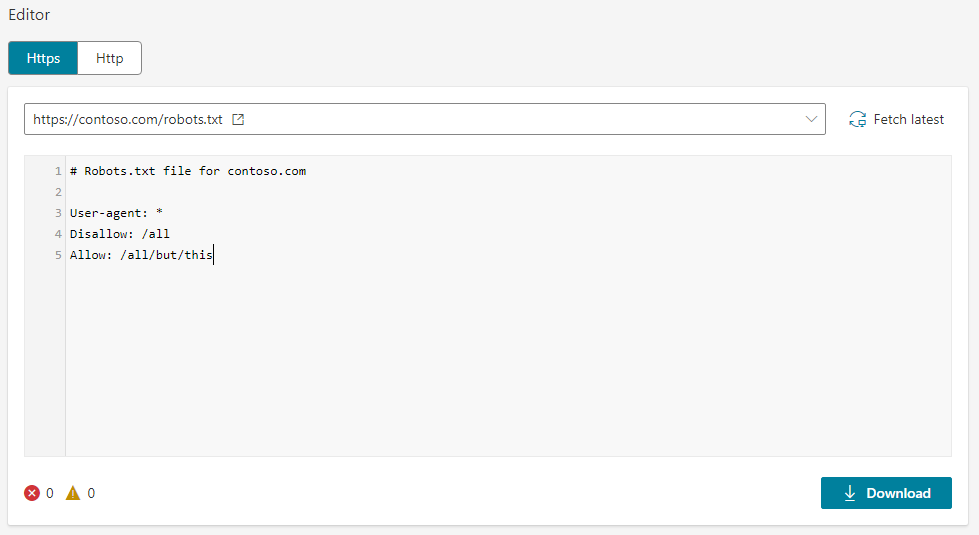
Bing Webmaster Tools provides its own robots.txt testing functionality. Microsoft says the tester can analyze the file and test whether submitted URLs are allowed or blocked for Bingbot.
This becomes more relevant for stores receiving meaningful visibility through Bing and Microsoft search experiences.
A rule behaving correctly for Google should not automatically be assumed to behave identically for every crawler.
6. Spotibo Robots.txt Tester: Useful for Quick Validation
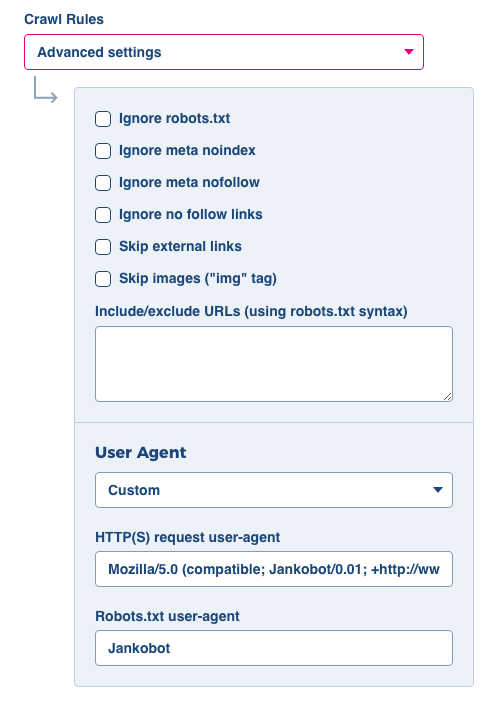
Spotibo provides a straightforward robots.txt testing option and states that its tester uses Google’s open-source robots.txt parser.
That makes it useful for smaller checks when installing desktop crawling software would be unnecessary.
For large stores, however, URL-by-URL validation should support rather than replace a full crawl simulation.
Which Robots.txt Testing Tool Should You Choose?
| Situation | Recommended Tool |
| Testing a proposed robots.txt before deployment | Screaming Frog |
| Auditing thousands of ecommerce URLs | Screaming Frog |
| Confirming Google’s live robots.txt processing | Google Search Console |
| Checking one URL quickly | TechnicalSEO.com |
| Connecting robots issues with broader technical problems | Sitebulb |
| Checking Bingbot behavior | Bing Webmaster Tools |
| Running a simple browser-based validation | Spotibo |
For most professional ecommerce audits, use two layers.
Use Screaming Frog or Sitebulb for discovery and simulation. Then use Google Search Console after deployment to confirm Google’s production view.
This combination is more reliable than depending on a single tool.
For other useful platforms, see this comparison of ecommerce SEO tools.
How to Test Robots.txt on an Ecommerce Website
A practical robots.txt test does not need to become complicated.
1. Build a Representative URL Sample
Collect examples of:
- Products.
- Categories.
- Filters.
- Sorting URLs.
- Pagination.
- Site search.
- Cart pages.
- Account pages.
- Product variants.
- Images, CSS, and JavaScript.
Include URLs you definitely want crawled and URLs you definitely want restricted.
2. Test Proposed Rules Before Publishing
Load the proposed robots.txt configuration into a crawler such as Screaming Frog.
Run your representative URLs against the new rules.
Pay particular attention to broad wildcard rules.
Google supports * for wildcard matching and $ for matching the end of a URL. Rule matching is based on specificity, with the least restrictive rule winning when equally specific rules conflict.
3. Check Different User Agents
Do not assume every bot receives identical instructions.
A specific Googlebot group can take precedence over the global User-agent: * group. Google evaluates the most specific matching user-agent group.
Test the crawlers that matter to your business.
4. Compare Robots.txt With Indexing Controls
A common ecommerce mistake is trying to solve every duplication problem with robots.txt.
Robots.txt controls crawling. Canonical tags and noindex solve different problems.
Google must be able to crawl a page to see its noindex directive. Blocking that same page in robots.txt can prevent Google from seeing the directive.
| Goal | Preferred Control | Why |
| Reduce crawling of unwanted URL patterns | robots.txt | Stops supported crawlers requesting matching URLs |
| Remove a crawlable page from search | noindex | Gives an explicit indexing instruction |
| Consolidate duplicate URLs | Canonical | Signals the preferred version |
| Remove deleted content | 404/410 | Signals that content no longer exists |
| Protect private information | Authentication | Robots.txt is not a security system |
Google also advises against using robots.txt for canonicalization.
Knowing these differences is a core part of understanding what an ecommerce technical SEO audit includes.
5. Validate the Live File
After deployment, open:
Confirm the file loads correctly.
Then check Search Console and recrawl important URL patterns.
Google generally caches robots.txt for up to 24 hours, although caching may last longer when refreshing the file is not possible.
That means a production change may not instantly change Googlebot’s behavior.
Robots.txt Problems Ecommerce Testing Tools Should Catch
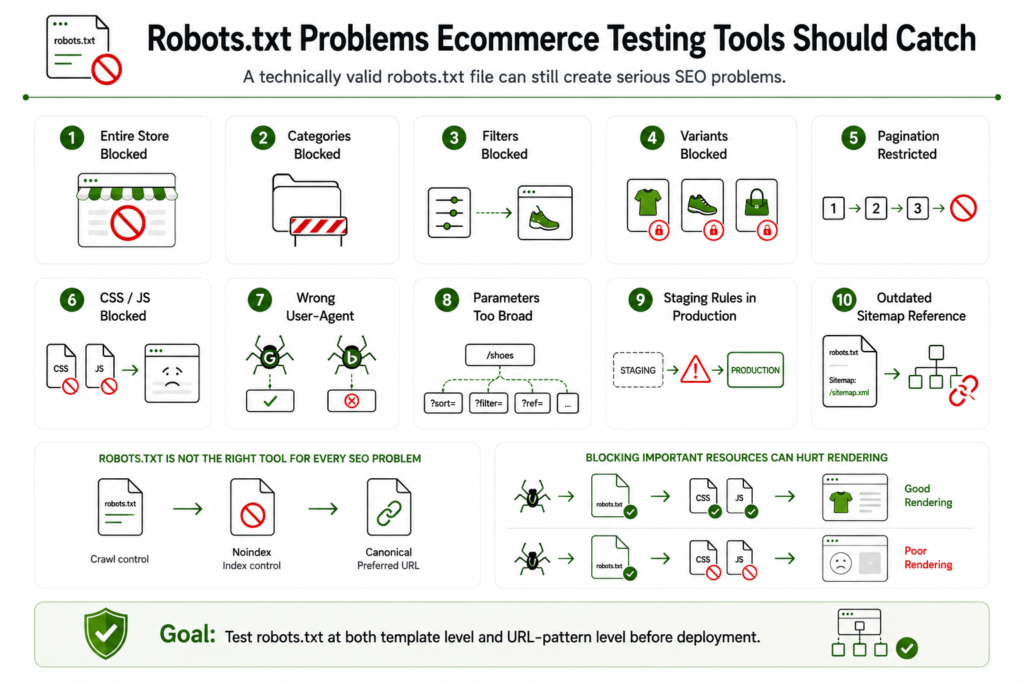
A technically valid file is not necessarily an SEO-safe file.
Look for these high-impact problems:
- Disallow: / accidentally blocking the complete store.
- Category directories blocked with overly broad rules.
- Important filtered landing pages blocked.
- Product variants blocked without reviewing search demand.
- Pagination restricted before checking product discovery.
- CSS or JavaScript required for rendering blocked.
- Different rules unintentionally affecting different user agents.
- Parameter rules matching more URLs than expected.
- Staging robots.txt rules moved into production.
- Sitemap references pointing to outdated locations.
- Robots.txt used where noindex or canonicalization is more appropriate.
Google warns that blocking important resource files can make pages harder for its crawler to understand.
These are the issues an ecommerce technical SEO audit should test at template and URL-pattern level.
Do Robots.txt Errors Directly Hurt Rankings?
Not every robots.txt error causes a ranking decline.
The risk comes from what the rule changes.
Blocking an important product prevents normal crawling. Blocking category resources may affect rendering. Allowing endless parameter combinations may reduce crawl efficiency on very large stores.
The business impact can appear as:
- Slower product discovery.
- Reduced category visibility.
- Index coverage problems.
- Wasted crawling.
- Stale search results.
- Missing product information.
- Lower organic traffic to commercial pages.
For ecommerce SEO, robots.txt should therefore be evaluated by URL value and crawl purpose, not simply whether the syntax passes a validator.
How Often Should Ecommerce Robots.txt Be Tested?
Test robots.txt whenever the site’s crawl architecture changes.
Important triggers include:
- Platform migrations.
- Store redesigns.
- New faceted navigation.
- Filter or sorting changes.
- URL structure changes.
- International store launches.
- Developer releases affecting routing.
- Large catalog expansions.
- Unexpected index coverage changes.
- Sudden declines in product or category crawling.
Large ecommerce sites should also include robots.txt checks in recurring technical QA.
A small configuration change can affect thousands of URLs at once.
Run a Screaming Frog Technical SEO Audit Before Scaling Content or Backlinks
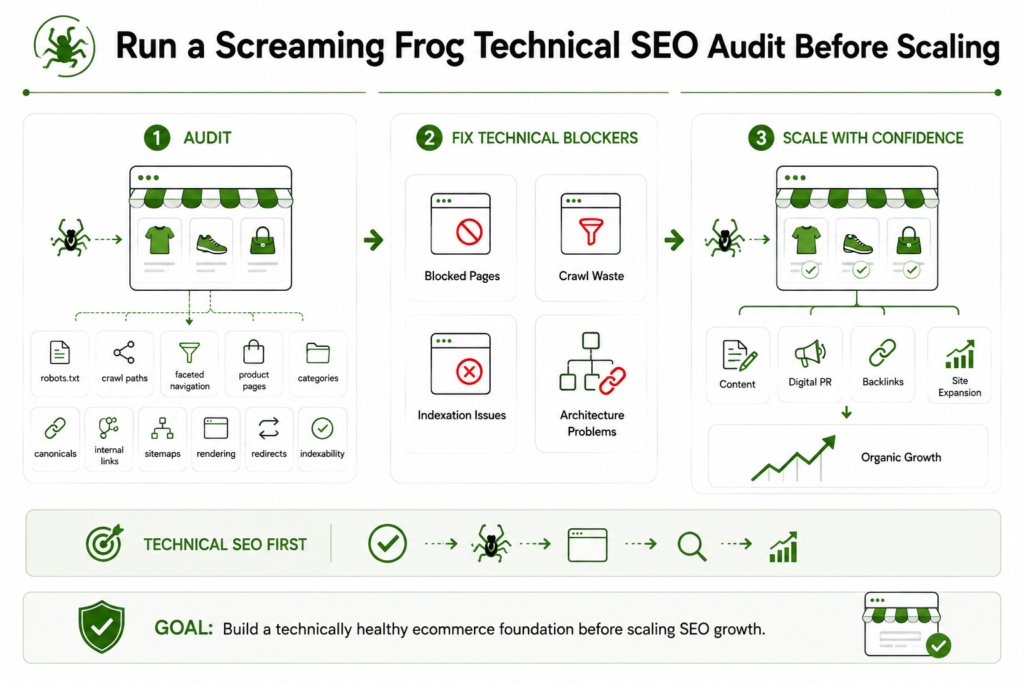
Robots.txt testing should not stop after finding one blocked URL.
Before investing more budget into content, digital PR, links, or site expansion, use Screaming Frog to test how search engines move through your ecommerce architecture.
Review robots.txt alongside crawl paths, faceted navigation, product pages, categories, canonical tags, internal links, sitemaps, rendering, redirects, and indexability.
E-commerce Technical SEO helps ecommerce store owners, marketing teams, developers, and agencies identify technical problems that restrict organic growth.
Our technical SEO specialists focus on finding where crawling, rendering, indexation, and site architecture break down across real ecommerce templates and URL patterns.
Start with a Screaming Frog audit before scaling ecommerce SEO so you know your strongest commercial pages are accessible before you spend more resources trying to rank them.