



Managing robots.txt for an ecommerce store does not have to feel risky or complicated. With the right approach, it helps search engines focus on the pages that support product discovery, organic traffic, and revenue.
Instead of allowing crawlers to move through endless filters and duplicate URLs, you can direct them toward valuable products, categories, and supporting content.
Robots.txt works best as part of a wider technical SEO system. It must align with internal links, canonical tags, XML sitemaps, status codes, indexing controls, and your ecommerce platform’s URL structure.
How Does Robots.txt Affect Ecommerce SEO?
Robots.txt affects ecommerce SEO by controlling which URLs search engine crawlers can request. It does not directly improve rankings.
Its main value comes from helping crawlers avoid low-value URLs and focus on pages that matter to customers and the business.
Robots.txt can:
- Control crawler access to specific URL paths.
- Reduce crawling of filters and sorting parameters.
- Limit access to search, cart, and account pages.
- Prevent crawlers from entering repetitive URL patterns.
- Support more efficient product and category discovery.
Robots.txt is not a reliable method for removing a page from search results. A blocked URL can still appear if Google discovers it through internal or external links.
Google’s robots.txt documentation explains that the file is designed to manage crawler traffic, not prevent a URL from being indexed.
Use noindex, authentication, redirects, or the correct HTTP status when removal from search is the goal.
A strong ecommerce technical SEO strategy treats robots.txt as one part of a wider system that includes crawl paths, sitemaps, canonical tags, rendering, and page-level indexing controls.
Why Robots.txt Matters More for Ecommerce Websites
Ecommerce platforms can generate thousands or millions of URLs from:
- Product filters.
- Sorting options.
- Internal search.
- Tracking parameters.
- Product variants.
- Pagination.
- Wishlists.
- Session IDs.
- Currency selectors.
A single category can produce many URL combinations when shoppers apply several filters. Most combinations may display the same products in a different order.
This creates two risks:
- Crawlers spend time on URLs with little search value.
- Important products and categories receive slower or less consistent crawling.
Google’s guidance on faceted navigation crawling warns that parameter combinations can create an almost infinite URL space. This can increase server activity and delay the discovery of useful pages.
| Ecommerce URL type | Typical SEO value | Common approach | Main risk |
|---|---|---|---|
| Product pages | High | Allow | Lost product visibility if blocked |
| Category pages | High | Allow | Reduced product discovery |
| Useful filtered categories | Medium to high | Review individually | Blocking long-tail landing pages |
| Sort and tracking URLs | Low | Often disallow | Duplicate crawling |
| Internal search results | Usually low | Often disallow | Near-infinite URL creation |
| Cart, checkout, and account | None | Usually disallow | Unnecessary crawler requests |
| CSS, JavaScript, and images | Supporting value | Allow | Incomplete rendering |
Crawl budget is mainly a concern for large, complex, or frequently updated websites. Smaller stores often gain more from clean navigation, accurate sitemaps, strong internal links, and correct indexation.
Crawlability and Indexability Are Different
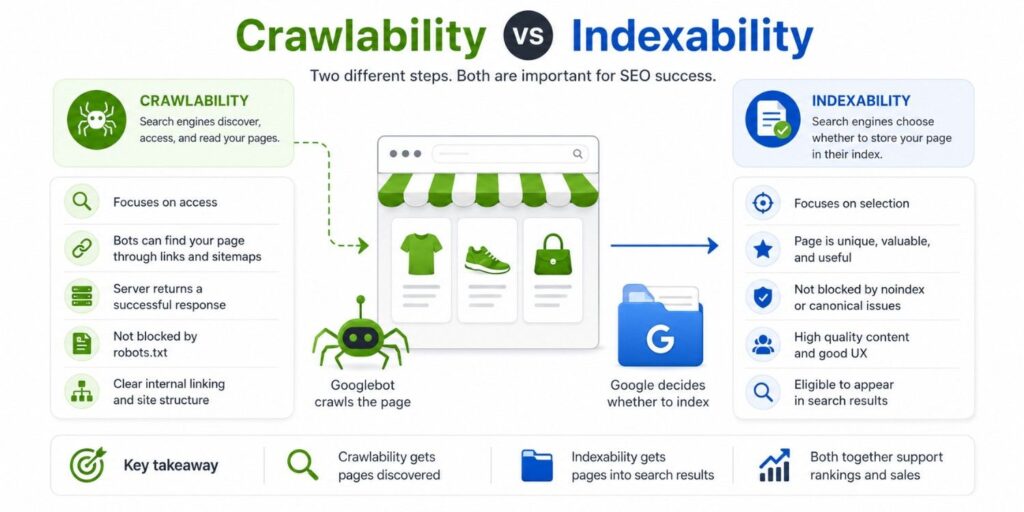
Crawlability asks whether a search engine can request a URL.
Indexability asks whether the URL can be stored and displayed in search results.
Robots.txt controls crawl access. It does not guarantee index removal.
This distinction is explained further in the guide to store crawlability and indexation.
| Control | Stops crawling? | Stops indexing? | Best ecommerce use |
|---|---|---|---|
Robots.txt Disallow | Yes | Not guaranteed | Crawl traps and low-value patterns |
Meta robots noindex | No | Yes, after crawling | Accessible pages that should leave the index |
X-Robots-Tag: noindex | No | Yes, after crawling | PDFs, feeds, and non-HTML files |
| Canonical tag | No | Not guaranteed | Duplicate URL consolidation |
| Password protection | Yes | Yes in practice | Private and staging areas |
404 or 410 | No initial block | Removes missing URLs over time | Permanently deleted pages |
301 redirect | No | Consolidates to another URL | Replaced products or categories |
Why a Blocked URL Can Stay Indexed
Google must crawl a page before it can detect a meta robots noindex directive.
When robots.txt blocks the page, Google cannot access that directive. The URL may remain indexed using information found through links, sitemaps, or other sources.
Google’s guidance on blocking search indexing confirms that crawlers must be allowed to access a page before they can process its noindex directive.
A safer removal process is:
- Allow Google to crawl the URL.
- Add a meta robots or
X-Robots-Tagnoindex. - Wait for Google to process the directive.
- Confirm that the URL has left the index.
- Disallow it later only when continued crawling causes a problem.
Why Blocking CSS or JavaScript Is Risky
Modern ecommerce pages often depend on JavaScript for prices, product variants, reviews, stock messages, recommendations, and internal links.
Blocking required scripts or styles can prevent Google from rendering and understanding the complete page.
The 2024 Web Almanac JavaScript report found that the median JavaScript payload reached approximately 558 KB on mobile and 613 KB on desktop.
That data shows how dependent modern websites have become on JavaScript resources.
Robots.txt is not a performance optimization tool. Blocking required resources will not solve Core Web Vitals problems and may make products harder for search engines to understand.
Where Robots.txt Can Help an Ecommerce Store
Faceted Navigation
Faceted navigation allows shoppers to filter products by attributes such as:
- Brand.
- Colour.
- Size.
- Price.
- Material.
- Availability.
- Product type.
- Customer rating.
Each filter or combination may generate another URL.
Block filtered URLs that have no independent search value. Keep selected filters crawlable when they satisfy clear demand and contain a useful range of products.
For example, a landing page for “black leather office chairs” may attract qualified traffic. A URL combining colour, price, stock status, rating, and sorting order is less likely to provide independent value.
Separate faceted URLs into four groups:
- Pages with search demand and useful inventory.
- Duplicate combinations without independent value.
- Empty or very thin filter results.
- Sorting and display-only parameters.
Do not apply a broad filter rule until you know which combinations receive impressions, links, traffic, or conversions.
Internal Search and Sorting URLs
Internal search can create a large crawl space containing spelling variations, empty results, and low-value query combinations.
Sorting parameters can also produce several versions of the same category without adding unique products or content.
Common examples include:
/search?q=blue+shoes
/category/shoes?sort=price-low
/category/shoes?view=grid
/category/shoes?items=100
These patterns are common disallow candidates. Confirm that important landing pages do not depend on the same URL structure before blocking them.
Cart, Checkout, Account, and Wishlist Areas
Cart, checkout, login, order history, and account pages do not need organic search visibility.
Blocking these areas can reduce unnecessary crawler activity.
Robots.txt does not protect sensitive information. Search crawlers may follow its rules, but other bots can ignore them.
Customer information and private areas still require authentication, permissions, and server-level security.
Tracking and Session Parameters
Campaign parameters, affiliate IDs, session IDs, and personalization values can create duplicate crawl paths.
Common examples include:
?utm_source=email
?affiliate=123
?sessionid=456
?ref=partner
Robots.txt may reduce crawling of these patterns, but it does not consolidate ranking signals.
Canonical tags, consistent internal links, redirects, and parameter governance should support the robots.txt rule.
| URL pattern | Decision | Supporting control |
|---|---|---|
/products/product-name/ | Allow | Self-referencing canonical |
/collections/category-name/ | Allow | Indexable content and internal links |
?sort=price-asc | Usually disallow | Canonical to the main category |
?filter=color-red | Review | Index only when demand exists |
/search?q= | Usually disallow | Remove from XML sitemaps |
/cart/ or /checkout/ | Disallow | Authentication and clean linking |
?utm_source= | Review | Canonical and parameter cleanup |
| Staging domain | Do not rely on robots.txt | Password protection |
What Ecommerce Pages Should Not Be Blocked?
Do not block a page only because it looks duplicate, receives little traffic, or contains an out-of-stock product.
First decide what the page should do in search.
Important URLs that normally require crawler access include:
- Revenue-driving product pages.
- Categories and subcategories.
- Brand landing pages.
- Buying guides.
- Pagination used for product discovery.
- XML sitemaps.
- Required JavaScript and CSS.
- Product images used in image search.
- Canonical destination pages.
For discontinued products, the correct action depends on traffic, backlinks, replacement products, inventory plans, and customer value.
You may keep the page live, redirect it to a close replacement, or return a 404 or 410 response when no suitable alternative exists.
A technical SEO audit process should review these outcomes before developers introduce broad disallow rules.
A Practical Ecommerce Robots.txt Example
The following template is only a starting point. URL structures and platform requirements vary.
User-agent: *
Disallow: /cart/
Disallow: /checkout/
Disallow: /account/
Disallow: /search
Disallow: /*?sort=
Disallow: /*?sessionid=
Allow: /

Sitemap: https://www.example.com/sitemap.xml
Do not block every filter parameter until you know which filtered pages should rank.
A broad rule can block useful landing pages built around brands, sizes, colours, materials, and other product attributes.
Google supports four main fields in robots.txt:
user-agentallowdisallowsitemap
Google does not support noindex or crawl-delay directives inside robots.txt.
In its analysis of unsupported robots.txt rules, Google found that unsupported directives conflicted with other rules in only 0.001% of the files where they appeared.
The percentage was small, but the finding supports using standard directives rather than relying on commands that Google does not recognise.
Shopify creates a default robots.txt file and allows controlled customization through robots.txt.liquid. Changes should preserve necessary platform rules unless testing shows a clear reason to adjust them.
An ecommerce audit checklist can connect robots.txt decisions with sitemaps, canonical tags, internal links, status codes, and index coverage.
Important Robots.txt Technical Limits
Google’s robots.txt specification sets a maximum supported file size of 500 KiB. Any content placed after that limit may be ignored.
Most ecommerce stores should never require a robots.txt file close to this size.
A very large file often means the site is blocking individual URLs instead of using clear path or parameter patterns.
Google also explains in its robots.txt update guidance that the file is generally cached for up to 24 hours.
An update may therefore not change crawling immediately. This makes pre-launch testing and rollback planning especially important.
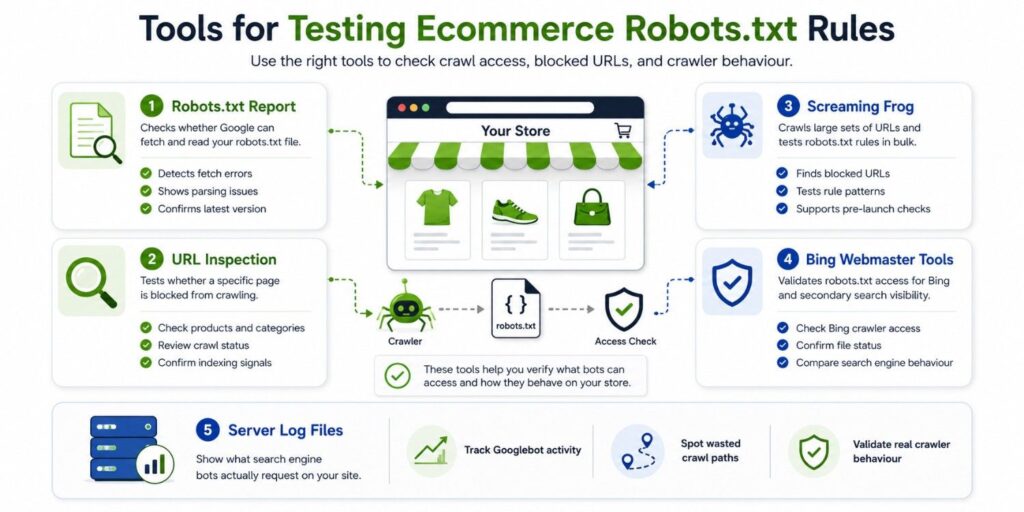
Tools for Testing Ecommerce Robots.txt Rules
Use several data sources when reviewing robots.txt. Each tool answers a different question.
| Tool | What it checks | Best use |
|---|---|---|
| Google Search Console robots.txt report | Fetch and parsing issues | Confirm Google can access the file |
| URL Inspection | Crawl and indexing status | Test individual product or category URLs |
| Screaming Frog SEO Spider | Rules across many URLs | Test patterns before deployment |
| Bing Webmaster Tools | Bing crawler access | Validate rules for another search engine |
| Server log analysis | Actual crawler requests | Measure where crawl activity is going |
Google Search Console Robots.txt Report
The Search Console robots.txt report shows which file Google detected and whether it found fetch or parsing problems.
Use it to:
- Check the fetched file.
- Review detected errors.
- Confirm the latest fetch time.
- Request a recrawl after an urgent correction.
Google Search Console URL Inspection
The URL Inspection tool shows whether Google is allowed to crawl a specific URL.
Test representative URLs rather than checking only the homepage.
Include:
- Products.
- Categories.
- Filter combinations.
- Pagination.
- Internal search pages.
- JavaScript files.
- CSS files.
- Product images.
The report separates crawl permission from indexing permission. This helps teams avoid confusing robots.txt rules with page-level indexation controls.
Screaming Frog SEO Spider
The Screaming Frog robots.txt tester can test proposed rules before they are published.
It can identify:
- URLs blocked by robots.txt.
- The rule responsible for each block.
- Internal links pointing to blocked URLs.
- Differences between crawler user agents.
- The effects of proposed rule changes.
Its custom robots.txt mode allows teams to test edited rules without changing the live website.
Server Log Files
Server logs show which URLs Googlebot and other crawlers actually request.
Logs can reveal:
- Repeated crawling of low-value parameters.
- Important products receiving few crawler visits.
- Crawl spikes after platform changes.
- Bots requesting blocked paths.
- Differences between crawler types.
Verify genuine Googlebot requests before relying on user-agent names. Unrelated bots can copy search engine user-agent strings.
How to Audit Robots.txt Safely
Export the current file before making changes.
Identify the URL patterns affected by each rule. Then test representative products, categories, filters, search pages, assets, and account URLs.
| Audit check | Method | Warning sign | Action |
|---|---|---|---|
| File availability | Open /robots.txt | Error, redirect, or HTML response | Serve a valid root text file |
| Revenue URL access | Test products and categories | Important pages are blocked | Remove or narrow the rule |
| Filter control | Crawl parameter patterns | Endless duplicate combinations | Block only low-value patterns |
| Indexing conflict | Compare Disallow and noindex | Noindex pages are blocked | Allow crawling until processed |
| Resource access | Render sample pages | Missing content or layout | Allow required resources |
| Sitemap alignment | Compare sitemap URLs with rules | Sitemap URLs are blocked | Fix the sitemap or rule |
| Log validation | Review crawler requests | Crawling remains focused on waste | Refine rules and internal links |
| Post-launch checks | Review Search Console | Product exclusions increase | Roll back and investigate |
Test both staging and production environments. The two files may contain different rules.
A full ecommerce SEO audit should compare crawl data with product revenue, inventory, landing-page traffic, internal links, and index coverage.
Common Robots.txt Mistakes
Blocking the Entire Store During a Launch
A staging rule such as Disallow: / can accidentally reach production during a migration or platform release.
This stops crawlers from accessing the entire store.
Protect staging with authentication. Add an automated launch check that verifies the live robots.txt file before deployment is completed.
Using Robots.txt to Remove URLs
Disallowing a URL does not guarantee deindexation.
Use noindex, authentication, a redirect, or a 404 or 410 response based on the required outcome.
The correct option becomes clearer when teams understand the technical audit fundamentals behind crawling, rendering, indexing, and serving.
Blocking All Parameters
A rule that blocks every URL containing a question mark may remove access to useful pagination, language handling, variants, or valuable filtered categories.
Map parameters by purpose.
Treat filters, sorting, tracking, pagination, sessions, currency settings, and product configuration as separate groups.
Changing Rules Without Monitoring
Robots.txt changes can affect thousands of URLs at once.
Record:
- The old file.
- The deployment date.
- The affected patterns.
- The expected outcome.
- The person responsible.
- The rollback process.
After deployment, monitor crawl requests, index coverage, product impressions, category traffic, rendered pages, and organic revenue.
Run a Technical SEO Audit Before Scaling Content or Backlinks
Before scaling SEO, run a technical audit that checks robots.txt rules, crawl paths, index coverage, faceted navigation, product pages, canonical tags, sitemaps, structured data, and performance.
Ecommerce Technical SEO helps store owners, marketers, developers, and agencies find technical issues that restrict organic growth.
The goal is simple: make valuable pages easier for search engines to find, render, understand, index, and rank.
Our technical SEO specialists help ecommerce teams identify and fix crawl, indexation, and performance issues before scaling content, backlinks, platform expansion, or international growth.